<?xml version="1.0" encoding="utf-8"?><feed xmlns="http://www.w3.org/2005/Atom" ><generator uri="https://jekyllrb.com/" version="4.4.1">Jekyll</generator><link href="https://eyenx.ch/feed.xml" rel="self" type="application/atom+xml" /><link href="https://eyenx.ch/" rel="alternate" type="text/html" /><updated>2026-06-04T07:20:06+00:00</updated><id>https://eyenx.ch/feed.xml</id><title type="html">eyenx</title><subtitle>yet another geek</subtitle><author><name>eyenx</name><email>eye@eyenx.ch</email></author><entry><title type="html">Encrypt Your OpenTofu State with OpenBao Transit Engine</title><link href="https://eyenx.ch/2026/02/20/encrypt-your-opentofu-state-with-openbao-transit/" rel="alternate" type="text/html" title="Encrypt Your OpenTofu State with OpenBao Transit Engine" /><published>2026-02-20T00:00:00+00:00</published><updated>2026-02-20T00:00:00+00:00</updated><id>https://eyenx.ch/2026/02/20/encrypt-your-opentofu-state-with-openbao-transit</id><content type="html" xml:base="https://eyenx.ch/2026/02/20/encrypt-your-opentofu-state-with-openbao-transit/"><![CDATA[<p>OpenTofu is an excellent tool for managing infrastructure as code. However, when handling secrets, you don’t want sensitive data ending up in your <code class="language-plaintext highlighter-rouge">tfstate</code> file, which might be stored in a bucket or a GitLab repository.</p>

<p>While <a href="https://opentofu.org/blog/ephemeral-ready-for-testing/">Ephemeral support</a> is available, not all providers have implemented this feature for secret values. An alternative is to secure your OpenTofu state by encrypting it with a provider like OpenBao’s transit engine.</p>

<h2 id="how-does-it-work">How Does It Work?</h2>

<p>Refer to the official <a href="https://opentofu.org/docs/language/state/encryption/">documentation</a> for detailed information. When using OpenBao, OpenTofu generates a key for encrypting and decrypting the state. This key is stored securely and encrypted with OpenBao’s transit engine keys. Ensure your OpenBao instance is accessible during the plan/apply process.</p>

<h2 id="getting-started">Getting Started</h2>

<p>First, create a sample <code class="language-plaintext highlighter-rouge">main.tf</code>:</p>

<div class="language-hcl highlighter-rouge"><div class="highlight"><pre class="highlight"><code><span class="nx">provider</span> <span class="s2">"random"</span> <span class="p">{}</span>

<span class="nx">resource</span> <span class="s2">"random_string"</span> <span class="s2">"password"</span> <span class="p">{</span>
   <span class="nx">length</span>  <span class="o">=</span> <span class="mi">16</span>
   <span class="nx">special</span> <span class="o">=</span> <span class="kc">true</span>
   <span class="nx">upper</span>   <span class="o">=</span> <span class="kc">true</span>
   <span class="nx">lower</span>   <span class="o">=</span> <span class="kc">true</span>
<span class="p">}</span>

<span class="nx">output</span> <span class="s2">"generated_password"</span> <span class="p">{</span>
  <span class="nx">value</span> <span class="o">=</span> <span class="nx">random_string</span><span class="p">.</span><span class="nx">password</span><span class="p">.</span><span class="nx">result</span>
<span class="p">}</span>
</code></pre></div></div>

<p>Assume the generated random string is a secret. Without encryption, this string is stored in plaintext in your Terraform state.</p>

<h2 id="enabling-openbaos-transit-engine-for-encryption">Enabling OpenBao’s Transit Engine for Encryption</h2>

<p>If you have a running OpenBao instance, enable the transit engine and create a key:</p>

<p><img src="/img/p/20260220_1.png" alt="pic1" />
<img src="/img/p/20260220_2.png" alt="pic1" />
<img src="/img/p/20260220_3.png" alt="pic1" /></p>

<p>Now, adjust your code to use OpenBao for encryption:</p>

<div class="language-hcl highlighter-rouge"><div class="highlight"><pre class="highlight"><code><span class="nx">terraform</span> <span class="p">{</span>
  <span class="nx">encryption</span> <span class="p">{</span>
    <span class="nx">key_provider</span> <span class="s2">"openbao"</span> <span class="s2">"openbao"</span> <span class="p">{</span>
      <span class="nx">address</span> <span class="o">=</span> <span class="s2">"http://127.0.0.1:8200"</span> <span class="c1"># OpenBao's address</span>
      <span class="nx">transit_engine_path</span> <span class="o">=</span> <span class="s2">"/transit"</span>  <span class="c1"># Transit engine path</span>
      <span class="nx">key_name</span> <span class="o">=</span> <span class="s2">"tofu-encryption"</span> <span class="c1"># Key name</span>
    <span class="p">}</span>
    <span class="nx">method</span> <span class="s2">"aes_gcm"</span> <span class="s2">"aes_gcm"</span> <span class="p">{</span> <span class="c1"># Encryption method</span>
      <span class="nx">keys</span> <span class="o">=</span> <span class="nx">key_provider</span><span class="p">.</span><span class="nx">openbao</span><span class="p">.</span><span class="nx">openbao</span>
    <span class="p">}</span>

    <span class="nx">state</span> <span class="p">{</span>
      <span class="nx">method</span> <span class="o">=</span> <span class="nx">method</span><span class="p">.</span><span class="nx">aes_gcm</span><span class="p">.</span><span class="nx">aes_gcm</span> <span class="c1"># Reference method</span>
    <span class="p">}</span>
  <span class="p">}</span>
<span class="p">}</span>
</code></pre></div></div>

<p>Ensure you have access to OpenBao by exporting your <code class="language-plaintext highlighter-rouge">BAO_TOKEN</code>. This can be integrated into a pipeline by performing JWT authentication with OpenBao and obtaining the token for OpenTofu execution. Ensure the token can access the transit engine and the created key.</p>

<div class="language-bash highlighter-rouge"><div class="highlight"><pre class="highlight"><code><span class="nb">export </span><span class="nv">BAO_TOKEN</span><span class="o">=</span>s.SECRETTOKEN
</code></pre></div></div>

<p>Run <code class="language-plaintext highlighter-rouge">tofu plan</code> to verify:</p>

<div class="language-bash highlighter-rouge"><div class="highlight"><pre class="highlight"><code><span class="nv">$ </span>tofu plan
OpenTofu used the selected providers to generate the following execution plan. Resource actions are indicated with the following symbols:
  + create

OpenTofu will perform the following actions:

  <span class="c"># random_string.password will be created</span>
  + resource <span class="s2">"random_string"</span> <span class="s2">"password"</span> <span class="o">{</span>
      + <span class="nb">id</span>          <span class="o">=</span> <span class="o">(</span>known after apply<span class="o">)</span>
      + length      <span class="o">=</span> 16
      + lower       <span class="o">=</span> <span class="nb">true</span>
      + min_lower   <span class="o">=</span> 0
      + min_numeric <span class="o">=</span> 0
      + min_special <span class="o">=</span> 0
      + min_upper   <span class="o">=</span> 0
      + number      <span class="o">=</span> <span class="nb">true</span>
      + numeric     <span class="o">=</span> <span class="nb">true</span>
      + result      <span class="o">=</span> <span class="o">(</span>known after apply<span class="o">)</span>
      + special     <span class="o">=</span> <span class="nb">true</span>
      + upper       <span class="o">=</span> <span class="nb">true</span>
    <span class="o">}</span>

Plan: 1 to add, 0 to change, 0 to destroy.

Changes to Outputs:
  + generated_password <span class="o">=</span> <span class="o">(</span>known after apply<span class="o">)</span>
</code></pre></div></div>

<p>Apply the changes:</p>

<div class="language-bash highlighter-rouge"><div class="highlight"><pre class="highlight"><code><span class="nv">$ </span>tofu apply
OpenTofu used the selected providers to generate the following execution plan. Resource actions are indicated with the following symbols:
  + create

OpenTofu will perform the following actions:

  <span class="c"># random_string.password will be created</span>
  + resource <span class="s2">"random_string"</span> <span class="s2">"password"</span> <span class="o">{</span>
      + <span class="nb">id</span>          <span class="o">=</span> <span class="o">(</span>known after apply<span class="o">)</span>
      + length      <span class="o">=</span> 16
      + lower       <span class="o">=</span> <span class="nb">true</span>
      + min_lower   <span class="o">=</span> 0
      + min_numeric <span class="o">=</span> 0
      + min_special <span class="o">=</span> 0
      + min_upper   <span class="o">=</span> 0
      + number      <span class="o">=</span> <span class="nb">true</span>
      + numeric     <span class="o">=</span> <span class="nb">true</span>
      + result      <span class="o">=</span> <span class="o">(</span>known after apply<span class="o">)</span>
      + special     <span class="o">=</span> <span class="nb">true</span>
      + upper       <span class="o">=</span> <span class="nb">true</span>
    <span class="o">}</span>

Plan: 1 to add, 0 to change, 0 to destroy.

Changes to Outputs:
  + generated_password <span class="o">=</span> <span class="o">(</span>known after apply<span class="o">)</span>

Do you want to perform these actions?
  OpenTofu will perform the actions described above.
  Only <span class="s1">'yes'</span> will be accepted to approve.

  Enter a value: <span class="nb">yes

</span>random_string.password: Creating...
random_string.password: Creation <span class="nb">complete </span>after 0s <span class="o">[</span><span class="nb">id</span><span class="o">=</span>hy<span class="o">{</span>XMOu4x<span class="o">{</span>aNTit%]

Apply <span class="nb">complete</span><span class="o">!</span> Resources: 1 added, 0 changed, 0 destroyed.

Outputs:

generated_password <span class="o">=</span> <span class="s2">"hy{XMOu4x{aNTit%"</span>
</code></pre></div></div>

<p>Check the Terraform state file. Without specifying a remote store, it’s saved locally:</p>

<div class="language-bash highlighter-rouge"><div class="highlight"><pre class="highlight"><code><span class="nv">$ </span><span class="nb">cat </span>terraform.tfstate
<span class="o">{</span><span class="s2">"serial"</span>:1,<span class="s2">"lineage"</span>:<span class="s2">"210a8601-69dd-14a4-7e7f-76bb4290bc7b"</span>,<span class="s2">"meta"</span>:<span class="o">{</span><span class="s2">"key_provider.openbao.openbao"</span>:<span class="s2">"eyJjaXBoZXJ0ZXh0IjoiZG1GMWJIUTZkakU2YURsVU5uaFRlbEZ6TTJwVGNXbGpXVGREYWpndmRrUmhVbnBMYkdKRWFrNVFXVWRvVGpWQlRERmlkR3czWlUwMVlVcElja1J6ZW1OSmFFMWhVblJpWjA1dlMzb3ZjMUZDWW1zM1NFUlROekU9In0="</span><span class="o">}</span>,<span class="s2">"encrypted_data"</span>:<span class="s2">"BAAwH4SXQ56wj7pQchZU5P2Fs3nnn2dblGTXxOYxiNsqxJvVzEyt7Hd5K4Zb8D4XLM760aXRJqwyLjAVB47536FBZaYWyNEmcb9XvIKGEbkUE6JVQ3vwDGQJybod6UKycTEfGeWkeN9i6l70MRdcml5Wuxrr2Q2UR8SfsujNbha/m81/hTcbYPeo0uAEBjFvqVL9BdNXjjgS0TrrycGr1XorD/xNkRmOoeTu4YUp3kqASl+CpDJxsYj6ozfve0O1wnR9A5lh3Q01truDCuR2Q330fON/K9rmTv7/VWrP/lYoh54Wlrk6+M5L8eM4yqYEHR4Edz2mdTaoFffJHgkSpNuiVz3mSb2NhpGZRfNqTvf5j9CZMBaj27yGsIDYFY6yx+gDxOOLAP2kvSiVGqfGenU9ZBgWSATjkTuOJr0BUVLCCZZCsGzBCD+AD7TGwGnNsV7ujt2W3ezirn79EIMPRlcXZcoNUU4wrn3+AHHk2At5R4yQuUhdDVik1cibjQtsgjiXfnRY7iufeOTb1t3y6uxD7IQfS/r4Avl6rXFHpS+xrf6TxSydCzWHCHYEwKrUEgCXB/9ztLomWi1iMekgTox41+6ZrhLmkqmnXJgCSycg8X1cNSTUtLXPJ2TXe5BX/Cc9A5e6PKoF5w2m+luQ2Ji39CTt/yE+hLih7eLiWEjoznH28H6XSfFFHY1woB2ZfufClTHsvq02s5d4l4gR4XG2N7Y4xNkGCyJnsvlTu2XEhQB5el/3uRYd7f6Wm4QqwpBeCfDOw6kj8Vk6/u0fVvoaCh9vJTWm1sLpFLYw9qRe7SKNtp/tZhSzleG0qt+EyR+1tSOMa2T4LzcmmojUo2CRXhewwRDYyjgSxImNpnecKGZrqx82vJHkIiC8r6vLLjUPh7Xg6g=="</span>,<span class="s2">"encryption_version"</span>:<span class="s2">"v0"</span><span class="o">}</span>%
</code></pre></div></div>

<p>Perfect! The state file is encrypted, and without access to OpenBao, it cannot be decrypted.</p>]]></content><author><name>eyenx</name><email>eye@eyenx.ch</email></author><category term="howto" /><category term="automation" /><category term="opentofu" /><category term="openbao" /><category term="secrets" /><category term="encryption" /><summary type="html"><![CDATA[Learn how to encrypt your Terraform state using OpenTofu and OpenBao's transit engine.]]></summary></entry><entry><title type="html">Self-hosted ACME Certificates with OpenBao and Traefik</title><link href="https://eyenx.ch/2025/12/23/self-hosted-acme-certificates-with-openbao-and-traefik/" rel="alternate" type="text/html" title="Self-hosted ACME Certificates with OpenBao and Traefik" /><published>2025-12-23T00:00:00+00:00</published><updated>2025-12-23T00:00:00+00:00</updated><id>https://eyenx.ch/2025/12/23/self-hosted-acme-certificates-with-openbao-and-traefik</id><content type="html" xml:base="https://eyenx.ch/2025/12/23/self-hosted-acme-certificates-with-openbao-and-traefik/"><![CDATA[<p><a href="https://en.wikipedia.org/wiki/Automatic_Certificate_Management_Environment">ACME</a> is an excellent protocol that allows us to obtain free certificates from Let’s Encrypt CA.</p>

<p>But what if you want to do the same thing internally within your company using your own CA?</p>

<p>There are many ACME-compatible software options available. Today, we’re going to specifically look into using OpenBao to generate and maintain your own Root CA, including Intermediates, and use that engine as an ACME Server.</p>

<p>Traefik will act as the client, requesting certificates via ACME for the Kubernetes ingresses it manages.</p>

<p>Let’s start with setting up <a href="https://openbao.org">OpenBao</a>.</p>

<h2 id="openbao-setup">OpenBao Setup</h2>

<p>Initially forked from HashiCorp Vault, OpenBao is a OSS secrets management solution that you can self-host. It includes several secrets engines, one of which is the PKI Engine, with which you can create your own certificates.</p>

<p>The PKI Engine has integrated <a href="https://openbao.org/api-docs/secret/pki/#acme-directories">ACME directories</a>, and we’ll utilize that.</p>

<p>Assuming you already have an OpenBao instance running, if not, here’s a sample <code class="language-plaintext highlighter-rouge">values.yaml</code> file to use with the official <a href="https://github.com/openbao/openbao-helm">openbao/openbao-helm Chart</a>:</p>

<div class="language-yaml highlighter-rouge"><div class="highlight"><pre class="highlight"><code><span class="na">global</span><span class="pi">:</span>
  <span class="c1"># TLS termination at the OpenBao level is recommended</span>
  <span class="na">tlsDisable</span><span class="pi">:</span> <span class="kc">false</span>
<span class="na">csi</span><span class="pi">:</span>
  <span class="na">enabled</span><span class="pi">:</span> <span class="kc">false</span>
<span class="na">injector</span><span class="pi">:</span>
  <span class="na">enabled</span><span class="pi">:</span> <span class="kc">false</span>
<span class="na">server</span><span class="pi">:</span>
  <span class="c1"># DISCLAIMER: Do not use static keys in production!</span>
  <span class="na">extraSecretEnvironmentVars</span><span class="pi">:</span>
    <span class="pi">-</span> <span class="na">envName</span><span class="pi">:</span> <span class="s">STATIC_SEAL_KEY</span>
      <span class="na">secretName</span><span class="pi">:</span> <span class="s">bao-static-seal-key</span>
      <span class="na">secretKey</span><span class="pi">:</span> <span class="s">key</span>
  <span class="na">resources</span><span class="pi">:</span>
    <span class="na">requests</span><span class="pi">:</span>
      <span class="na">memory</span><span class="pi">:</span> <span class="s">1Gi</span>
      <span class="na">cpu</span><span class="pi">:</span> <span class="s">500m</span>
    <span class="na">limits</span><span class="pi">:</span>
      <span class="na">memory</span><span class="pi">:</span> <span class="s">2Gi</span>
      <span class="na">cpu</span><span class="pi">:</span> <span class="s">1000m</span>
  <span class="na">ha</span><span class="pi">:</span>
    <span class="na">enabled</span><span class="pi">:</span> <span class="kc">true</span>
    <span class="na">replicas</span><span class="pi">:</span> <span class="m">3</span>
    <span class="na">raft</span><span class="pi">:</span>
      <span class="na">enabled</span><span class="pi">:</span> <span class="kc">true</span>
      <span class="na">config</span><span class="pi">:</span> <span class="pi">|</span>
        <span class="s">ui = true</span>
        <span class="s">listener "tcp" {</span>
          <span class="s">address = "[::]:8200"</span>
          <span class="s">cluster_address = "[::]:8201"</span>

          <span class="s">tls_cert_file = "/openbao/tls/tls.crt"</span>
          <span class="s">tls_key_file = "/openbao/tls/tls.key"</span>
        <span class="s">}</span>
        <span class="s">storage "raft" {</span>
          <span class="s">path = "/openbao/data"</span>

          <span class="s">retry_join {</span>
            <span class="s">leader_tls_servername = "bao.example.com"</span>
            <span class="s">leader_api_addr = "https://openbao-active:8200"</span>
            <span class="s">leader_client_cert_file = "/openbao/tls/tls.crt"</span>
            <span class="s">leader_client_key_file = "/openbao/tls/tls.key"</span>
            <span class="s">leader_ca_cert_file = "/openbao/tls/ca.crt"</span>
          <span class="s">}</span>
        <span class="s">}</span>

        <span class="s"># DISCLAIMER: Do not use static keys in production!</span>
        <span class="s">seal "static" {</span>
          <span class="s">current_key_id = "ID"</span>
          <span class="s">current_key = "env://STATIC_SEAL_KEY"</span>
        <span class="s">}</span>
        <span class="s">service_registration "kubernetes" {}</span>

  <span class="na">updateStrategyType</span><span class="pi">:</span> <span class="s">RollingUpdate</span>

  <span class="na">livenessProbe</span><span class="pi">:</span>
    <span class="na">enabled</span><span class="pi">:</span> <span class="kc">true</span>

  <span class="na">ingress</span><span class="pi">:</span>
    <span class="na">tls</span><span class="pi">:</span>
      <span class="pi">-</span> <span class="na">hosts</span><span class="pi">:</span>
          <span class="pi">-</span> <span class="s">bao.example.com</span>
        <span class="na">secretName</span><span class="pi">:</span> <span class="s">bao-tls</span>
    <span class="na">enabled</span><span class="pi">:</span> <span class="kc">true</span>
    <span class="na">ingressClassName</span><span class="pi">:</span> <span class="s">myingress</span>
    <span class="na">hosts</span><span class="pi">:</span>
      <span class="pi">-</span> <span class="na">host</span><span class="pi">:</span> <span class="s">bao.example.com</span>
        <span class="na">paths</span><span class="pi">:</span> <span class="pi">[]</span>
  <span class="na">volumes</span><span class="pi">:</span>
    <span class="pi">-</span> <span class="na">name</span><span class="pi">:</span> <span class="s">tls</span>
      <span class="na">secret</span><span class="pi">:</span>
        <span class="na">secretName</span><span class="pi">:</span> <span class="s">bao-tls</span>
  <span class="na">volumeMounts</span><span class="pi">:</span>
    <span class="pi">-</span> <span class="na">name</span><span class="pi">:</span> <span class="s">tls</span>
      <span class="na">mountPath</span><span class="pi">:</span> <span class="s">/openbao/tls</span>
      <span class="na">readOnly</span><span class="pi">:</span> <span class="kc">true</span>
</code></pre></div></div>

<p>After setup, you’ll need to initialize your OpenBao instance:</p>

<div class="language-plaintext highlighter-rouge"><div class="highlight"><pre class="highlight"><code>bao operator init --recovery-threshold=NUMBER --recovery-shares=NUMBER
</code></pre></div></div>

<p>Choose a number of recovery-shares and threshold that suits your needs. For more information about recovery keys, refer to the <a href="https://openbao.org/docs/2.4.x/concepts/seal/#recovery-key">documentation</a>.</p>

<p>Once initialized, you’ll have a root token that you can use to configure your OpenBao instance. 
The root token is meant for short-term use to set up another authentication method. Revoke your root token as soon as you’ve done that, as keeping it around is considered bad practice. 
Ideally, set up a working authentication method directly upon initialization using the <a href="https://openbao.org/docs/2.4.x/configuration/self-init/">self-init feature</a> of OpenBao.</p>

<h2 id="pki-engine">PKI Engine</h2>

<p>Now, let’s create our PKI Engines to host our Root and Intermediate CAs (also see the official <a href="https://openbao.org/docs/secrets/pki/quick-start-root-ca/">documentation</a>):</p>

<div class="language-plaintext highlighter-rouge"><div class="highlight"><pre class="highlight"><code># Enable one PKI Engine for our Root CA
bao secrets enable pki_root

# Tune it to have a maximum TTL of 10 years
bao secrets tune -max-lease-ttl=3650d pki_root

# Generate our Root CA
bao write pki_root/root/generate/internal common_name="Company CA" ttl=3650d

# Set URL Configuration
bao write pki_root/config/urls issuing_certificates="https://bao.example.com/v1/pki_root/ca" crl_distribution_points="https://bao.example.com/v1/pki_root/crl"

# Enable PKI Engine for our Intermediate CA
bao secrets enable pki_int

# Tune it to have a maximum TTL of 5 years
bao secrets tune -max-lease-ttl=43800h pki_int

# Create our Intermediate CA
bao write pki_int/intermediate/generate/internal common_name="Company INT 2025" ttl=43800h -format=json | jq .data.csr -r &gt; int.csr

# Use the created CSR to get it signed by the Root PKI
bao write pki_root/root/sign-intermediate csr=@int.csr format=pem_bundle ttl=43800h -format=json | jq .data.certificate -r &gt; int.crt

# Now set the Intermediate CA to be signed with the signed CRT
bao write pki_int/intermediate/set-signed certificate=@int.crt

# Finally, set URL Configuration for the Intermediate CA
bao write pki_int/config/urls issuing_certificates="https://bao.example.com/v1/pki_int/ca" crl_distribution_points="https://bao.example.com/v1/pki_int/crl"
</code></pre></div></div>

<p>Next, activate the ACME feature on the Intermediate PKI Engine and create a role for Traefik’s use:</p>

<div class="language-plaintext highlighter-rouge"><div class="highlight"><pre class="highlight"><code>bao write pki_int/config/cluster aia_path=https://bao.example.com/v1/pki_int path=https://bao.example.com/v1/pki_int

bao write pki_int/config/acme enabled=true

# This will set the max_ttl of the created certificates to 1 year
bao write pki_int/roles/traefik allowed_domains=example.com allow_subdomains=true max_ttl=365d
</code></pre></div></div>

<p>We are now ready to use OpenBao with Traefik.</p>

<h2 id="traefik">Traefik</h2>

<p>Configuring Traefik can be somewhat challenging to understand, and it took me some time to get this working. If you think my configuration could be improved, please let me know.</p>

<div class="language-yaml highlighter-rouge"><div class="highlight"><pre class="highlight"><code><span class="c1"># Values.yaml for Traefik Helm Chart</span>
<span class="na">volumes</span><span class="pi">:</span>
<span class="na">providers</span><span class="pi">:</span>
  <span class="na">kubernetesIngress</span><span class="pi">:</span>
    <span class="na">ingressClass</span><span class="pi">:</span> <span class="s">traefik</span>
<span class="na">deployment</span><span class="pi">:</span>
  <span class="na">replicas</span><span class="pi">:</span> <span class="m">1</span>
<span class="na">ingressClass</span><span class="pi">:</span>
  <span class="na">name</span><span class="pi">:</span> <span class="s">traefik</span>
  <span class="na">isDefaultClass</span><span class="pi">:</span> <span class="kc">true</span>
<span class="na">certificatesResolvers</span><span class="pi">:</span>
  <span class="na">openbao</span><span class="pi">:</span>
    <span class="na">acme</span><span class="pi">:</span>
      <span class="na">email</span><span class="pi">:</span> <span class="s">admin@openbao.example.com</span>
      <span class="na">storage</span><span class="pi">:</span> <span class="s">/data/acme.json</span>
      <span class="na">caServer</span><span class="pi">:</span> <span class="s">https://bao.example.com/v1/pki_int/roles/traefik/acme/directory</span>
      <span class="na">httpChallenge</span><span class="pi">:</span>
        <span class="na">entrypoint</span><span class="pi">:</span> <span class="s">web</span>
<span class="na">ports</span><span class="pi">:</span>
  <span class="na">web</span><span class="pi">:</span>
    <span class="na">redirectTo</span><span class="pi">:</span>
      <span class="na">port</span><span class="pi">:</span> <span class="s">websecure</span>
  <span class="na">websecure</span><span class="pi">:</span>
    <span class="na">tls</span><span class="pi">:</span>
      <span class="na">enabled</span><span class="pi">:</span> <span class="kc">true</span>
      <span class="na">resolver</span><span class="pi">:</span> <span class="s">openbao</span>
</code></pre></div></div>

<p>There might be other configurations you would want, such as how to expose Traefik, but that is beyond the scope of this guide.</p>

<p>Upon starting Traefik, you should see it initiating the <code class="language-plaintext highlighter-rouge">acme.Provider</code>:</p>

<div class="language-plaintext highlighter-rouge"><div class="highlight"><pre class="highlight"><code>2025-12-23T06:21:18Z INF Starting provider *acme.Provider
2025-12-23T06:21:24Z INF Register... providerName=openbao.acme
</code></pre></div></div>

<h2 id="ingress">Ingress</h2>

<p>Now, let’s create an Ingress for an application:</p>

<div class="language-yaml highlighter-rouge"><div class="highlight"><pre class="highlight"><code><span class="na">apiVersion</span><span class="pi">:</span> <span class="s">networking.k8s.io/v1</span>
<span class="na">kind</span><span class="pi">:</span> <span class="s">Ingress</span>
<span class="na">metadata</span><span class="pi">:</span>
  <span class="na">annotations</span><span class="pi">:</span>
    <span class="na">traefik.ingress.kubernetes.io/router.tls</span><span class="pi">:</span> <span class="s2">"</span><span class="s">true"</span>
    <span class="na">traefik.ingress.kubernetes.io/router.tls.certresolver</span><span class="pi">:</span> <span class="s">openbao</span>
  <span class="na">name</span><span class="pi">:</span> <span class="s">monitoring-grafana</span>
  <span class="na">namespace</span><span class="pi">:</span> <span class="s">monitoring</span>
<span class="na">spec</span><span class="pi">:</span>
  <span class="na">ingressClassName</span><span class="pi">:</span> <span class="s">traefik</span>
  <span class="na">rules</span><span class="pi">:</span>
  <span class="pi">-</span> <span class="na">host</span><span class="pi">:</span> <span class="s">grafana.example.com</span>
    <span class="na">http</span><span class="pi">:</span>
      <span class="na">paths</span><span class="pi">:</span>
      <span class="pi">-</span> <span class="na">backend</span><span class="pi">:</span>
          <span class="na">service</span><span class="pi">:</span>
            <span class="na">name</span><span class="pi">:</span> <span class="s">monitoring-grafana</span>
            <span class="na">port</span><span class="pi">:</span>
              <span class="na">number</span><span class="pi">:</span> <span class="m">80</span>
        <span class="na">path</span><span class="pi">:</span> <span class="s">/</span>
        <span class="na">pathType</span><span class="pi">:</span> <span class="s">ImplementationSpecific</span>
  <span class="na">tls</span><span class="pi">:</span>
  <span class="pi">-</span> <span class="na">hosts</span><span class="pi">:</span>
    <span class="pi">-</span> <span class="s">grafana.example.com</span>
</code></pre></div></div>

<p>The critical annotations here are:</p>

<div class="language-yaml highlighter-rouge"><div class="highlight"><pre class="highlight"><code><span class="na">traefik.ingress.kubernetes.io/router.tls</span><span class="pi">:</span> <span class="s2">"</span><span class="s">true"</span>
<span class="na">traefik.ingress.kubernetes.io/router.tls.certresolver</span><span class="pi">:</span> <span class="s">openbao</span>
</code></pre></div></div>

<p>These tell Traefik to create a certificate for this Ingress using our certresolver, OpenBao.</p>

<p>If everything is configured correctly, you shouldn’t see many logs from Traefik. The Ingress should work, and in OpenBao, you’ll find the generated certificate as well:</p>

<div class="language-plaintext highlighter-rouge"><div class="highlight"><pre class="highlight"><code>bao list pki_int/certs
Keys
----
xz:xy:x0:tt

bao read pki_int/cert/xz:xy:x0:tt -format=json | jq .data.certificate -r | openssl x509 -noout -text
Certificate:
    Data:
        Version: 3 (0x2)
        Serial Number: xyz
        Signature Algorithm: sha256WithRSAEncryption
        Issuer: CN=Company INT
        Validity
            Not Before: Dec 23 06:28:44 2025 GMT
            Not After : Jan 24 06:29:14 2026 GMT
        Subject: CN=grafana.example.com
        Subject Public Key Info:
            Public Key Algorithm: rsaEncryption
                Public-Key: (too many bits)
                Modulus:
                    xyz
                Exponent: 65537 (0x10001)
        X509v3 extensions: [xyz]
    Signature Algorithm: sha256WithRSAEncryption
    Signature Value: xyz
</code></pre></div></div>

<p>Congratulations, you have created certificates with your own PKI by using the ACME protocol on <a href="https://openbao.org">OpenBao</a>!</p>]]></content><author><name>eyenx</name><email>eye@eyenx.ch</email></author><category term="howto" /><category term="containers" /><category term="automation" /><category term="traefik" /><category term="openbao" /><category term="secrets" /><category term="pki" /><category term="acme" /><summary type="html"><![CDATA[Leverage OpenBao's ACME directory to create certificates for Traefik Ingresses]]></summary></entry><entry><title type="html">Cleaning Up My Closet AKA Synapse</title><link href="https://eyenx.ch/2025/12/02/cleaning-up-my-closet-aka-synapse/" rel="alternate" type="text/html" title="Cleaning Up My Closet AKA Synapse" /><published>2025-12-02T00:00:00+00:00</published><updated>2025-12-02T00:00:00+00:00</updated><id>https://eyenx.ch/2025/12/02/cleaning-up-my-closet-aka-synapse</id><content type="html" xml:base="https://eyenx.ch/2025/12/02/cleaning-up-my-closet-aka-synapse/"><![CDATA[<p>I’ve been running a self-hosted Matrix installation with the <a href="https://github.com/matrix-org/synapse/">Synapse</a> homeserver, which includes a variety of integrations from Signal to IRC with <a href="https://github.com/hifi/heisenbridge">Heisenbridge</a>.</p>

<p>Over time, the number of rooms and chats can really add up, along with the disk space used by events in the PostgreSQL database. This led me to look for a way to purge the history of channels and free up space in my database.</p>

<p>Thankfully, the Synapse server provides an <a href="https://matrix-org.github.io/synapse/latest/admin_api/purge_history_api.html">open API</a> that allows for history purging via a simple curl command:</p>

<div class="language-sh highlighter-rouge"><div class="highlight"><pre class="highlight"><code><span class="nv">TIMESTAMP</span><span class="o">=</span><span class="k">$((</span><span class="si">$(</span><span class="nb">date</span> <span class="nt">-d</span> <span class="s2">"-1 year"</span> +%s<span class="si">)</span> <span class="o">*</span> <span class="m">1000</span><span class="k">))</span> <span class="c"># 1 year ago</span>
curl <span class="nt">-H</span> <span class="s2">"Authorization: Bearer </span><span class="nv">$TOKEN</span><span class="s2">"</span> <span class="s2">"http://localhost:8008/_synapse/admin/v1/purge_history/</span><span class="nv">$room</span><span class="s2">"</span> <span class="nt">-X</span> POST <span class="nt">-d</span> <span class="s2">"{</span><span class="se">\"</span><span class="s2">purge_up_to_ts</span><span class="se">\"</span><span class="s2">:</span><span class="nv">$TIMESTAMP</span><span class="s2">,</span><span class="se">\"</span><span class="s2">delete_local_events</span><span class="se">\"</span><span class="s2">:true}"</span>
</code></pre></div></div>

<p>You’ll need an admin token, which you can obtain from your user account in the Element web app (assuming you are an admin).</p>

<p>Next, we need a list of rooms. The API can assist with this as well:</p>

<div class="language-sh highlighter-rouge"><div class="highlight"><pre class="highlight"><code>curl <span class="nt">-H</span> <span class="s2">"Authorization: Bearer </span><span class="nv">$TOKEN</span><span class="s2">"</span> <span class="s2">"http://localhost:8008/_synapse/admin/v1/rooms?limit=1000"</span> <span class="o">&gt;</span> roomlist.json
</code></pre></div></div>

<p>To prepare for the purge, we’ll clean up the <code class="language-plaintext highlighter-rouge">roomlist.json</code> and encode the room IDs:</p>

<div class="language-sh highlighter-rouge"><div class="highlight"><pre class="highlight"><code><span class="nb">cat </span>roomlist.json | jq <span class="s1">'.rooms[] | .room_id'</span> <span class="nt">-r</span> | <span class="nb">sed</span> <span class="s1">'s/\!/%21/g'</span> <span class="o">&gt;</span> to_purge.txt
</code></pre></div></div>

<p>Now, let’s execute the <code class="language-plaintext highlighter-rouge">purge_history</code> API call for all the rooms:</p>

<div class="language-sh highlighter-rouge"><div class="highlight"><pre class="highlight"><code><span class="nv">TIMESTAMP</span><span class="o">=</span><span class="k">$((</span><span class="si">$(</span><span class="nb">date</span> <span class="nt">-d</span> <span class="s2">"-1 year"</span> +%s<span class="si">)</span> <span class="o">*</span> <span class="m">1000</span><span class="k">))</span> <span class="c"># 1 year ago</span>
<span class="k">while </span><span class="nb">read </span>room<span class="p">;</span> <span class="k">do
  </span>curl <span class="nt">-H</span> <span class="s2">"Authorization: Bearer </span><span class="nv">$TOKEN</span><span class="s2">"</span> <span class="s2">"http://localhost:8008/_synapse/admin/v1/purge_history/</span><span class="nv">$room</span><span class="s2">"</span> <span class="nt">-X</span> POST <span class="nt">-d</span> <span class="s2">"{</span><span class="se">\"</span><span class="s2">purge_up_to_ts</span><span class="se">\"</span><span class="s2">:</span><span class="nv">$TIMESTAMP</span><span class="s2">,</span><span class="se">\"</span><span class="s2">delete_local_events</span><span class="se">\"</span><span class="s2">:true}"</span>
<span class="k">done</span> &lt; to_purge.txt
</code></pre></div></div>

<p>This process will remove all events older than one year.</p>

<p>It might take a while, but don’t forget to run a <code class="language-plaintext highlighter-rouge">VACUUM FULL;</code> on your database afterward to reclaim the space.</p>

<p>I managed to reclaim about 40GiB of space:</p>

<p><img src="/img/p/20251202_1.png" alt="disk" /></p>]]></content><author><name>eyenx</name><email>eye@eyenx.ch</email></author><category term="howto" /><category term="containers" /><category term="automation" /><category term="matrix" /><category term="synapse" /><summary type="html"><![CDATA[Discover how to eliminate old events and reclaim disk space on your self-hosted Synapse server.]]></summary></entry><entry><title type="html">Migrating from Bitnami to Bitnami Legacy with Kyverno</title><link href="https://eyenx.ch/2025/10/12/rewrite-bitnami-to-bitnamilegacy-using-kyverno/" rel="alternate" type="text/html" title="Migrating from Bitnami to Bitnami Legacy with Kyverno" /><published>2025-10-12T00:00:00+00:00</published><updated>2025-10-12T00:00:00+00:00</updated><id>https://eyenx.ch/2025/10/12/rewrite-bitnami-to-bitnamilegacy-using-kyverno</id><content type="html" xml:base="https://eyenx.ch/2025/10/12/rewrite-bitnami-to-bitnamilegacy-using-kyverno/"><![CDATA[<p>You may have recently heard about <a href="https://news.broadcom.com/app-dev/broadcom-introduces-bitnami-secure-images-for-production-ready-containerized-applications">Bitnami’s move to Secure Images for Production-Ready containerized Applications</a>.</p>

<p>Bitnami has transitioned to providing Secure Images for containerized applications, which are no longer free. If you’re encountering <code class="language-plaintext highlighter-rouge">ImagePullBackOff</code> errors in your Kubernetes cluster, it’s likely due to this change.</p>

<p>In short, Bitnami container images now require a subscription. However, they’ve provided a temporary solution by allowing access to older images through the <code class="language-plaintext highlighter-rouge">docker.io/bitnamilegacy</code> registry.</p>

<p><strong>Note:</strong> This is a stopgap measure. The long-term goal is to move away from Bitnami entirely. Projects like <a href="https://github.com/cloudpirates">CloudPirates</a> are already working on providing alternative images and charts.</p>

<h2 id="kyverno-policy-example">Kyverno Policy Example</h2>

<div class="language-plaintext highlighter-rouge"><div class="highlight"><pre class="highlight"><code>---
apiVersion: kyverno.io/v1
kind: ClusterPolicy
metadata:
  name: patch-bitnami-to-bitnamilegacy
spec:
  admission: true
  background: false
  validationFailureAction: Audit
  rules:
    - name: patch
      match:
        any:
          - resources:
              kinds:
                - Pod
              operations:
                - CREATE
      mutate:
        foreach:
          - list: request.object.spec.containers
            patchStrategicMerge:
              spec:
                containers:
                  - image: &gt;-
                      ".registry }}/bitnamilegacy/".path | split(@,'/')[1] }}:".tag }}
                    name: ""
            preconditions:
              all:
                - value: True
                  operator: Equals
                  key: '".path | contains(@,''bitnami/'') }}'
                - key: '".registry }}'
                  operator: Equals
                  value: docker.io
          - list: request.object.spec.initContainers || []
            patchStrategicMerge:
              spec:
                containers:
                  - image: &gt;-
                      ".registry }}/bitnamilegacy/".path | split(@,'/')[1] }}:".tag }}
                    name: ""
            preconditions:
              all:
                - value: True
                  operator: Equals
                  key: '".path | contains(@,''bitnami/'') }}'
                - key: '".registry }}'
                  operator: Equals
                  value: docker.io
      skipBackgroundRequests: true
</code></pre></div></div>

<p>See also on <a href="https://playground.kyverno.io/#/?content=N4IgDg9gNglgxgTxALhAWgwHQHYEMwwBqApgE4DOME2yABANYIBuZ2EAdFQPRMCMO9GNgAmdAMJQAruQAuZAArR4CHAFtiM3MNybkOWrTzq6YHXAAWaAEYwZRhGhkRrt%2B1GIBzXIhzkwxOD1sAy1VGHJKajoZUklifVorb3oPUghJEToAM1wocnjg2iZcmG0ZKmwAMVwYKVJiAEE4cqjaBslhWwTY93IggwM0Q1xjWlMZCwSB2lUzc37pgdxsBAXFgaH68nTSOGI%2BqfXFwREDwqOjocVhQ4uDCH9SHQqzu8vaMQAlAFEGgBVvrcZpJNHI1osshB6t55kDpkNYLI6PUAI5xWTsCBWABWARk7D8AXYcGomiEZHIcMW4wsAGUYjpPPAALJkDzEcFvQmBKkXEnYMnYCmct4bWgwWbsugAPjQvNFBmAwHFkv2xNJNSFFHYmBASuI7nUAvYRmIAF8zbr2PUPOEYghaBauDY7CNap5vAguEqVbh2eR1QLNRSdXrgAbiEb8aaLVbxuZaAAfWh%2BWAyAAUAAEADQAci4uYAlABtXgAXUdZuQPolfrV/MFId1%2BsNxGNMctIHYmg8lflb1NdGbyojUZNI2IfZA/bG9X5nRa2FeCtouSgIreQ2KUg5tD%2BsQKK8WDzIOihdG%2BaNylPOR4YxFWtFzNdVAYbwe1w9HbejE9jXfjJNaHfIRyCzPNcxdIwYALItK1zGd4XvR9n2VWt/UDRtPzDb92z/TtrSZWRSAdC0ENvI8TyeJxSAvK88kQxZtziOhhAgOB6DITgIHlBE7WRYg0X2fEsVxZoCX8OBOGwWwxA1ckKCTZNizLGcaXMelqKZOBWVIKVGO5Dc7hArVlzvWghnQ3dZUYi4XzrAMhFk%2BTTNDFtIx/cd1H/QjbWI0izWdVw3XcLxEG9NDX2k5ygwUgMv1bPDvIIwDk1TWxwPzItSwrC1q0ihzopkOTYtchKPKS80CJ7PsKLvQdaGHWhcN/dQpzUudqAXF4jPWNdeveZjd33OJbIGKiz1o2hL0ka8xoMTiUPsjCnOKlymxwxLWqquMdATZMTLAnNc0g4Kwlgwt4LGoZFroVDfRWmS1tKjb3LHDsrRtO0SKuuqFQmmi6Nmhi/tFIbWPYzjSG4oFyEEMAACFklSdIRE%2BQT0RkPpaBiOIQGzEAth2PYUBAfAiApCo6D4AQhFEWhrjUDQtB0XAFgauRZDQSBhDQDwIAgG5ClNPxvF3YRiBySQoBkBIoFwKwDTM2dBaHEBcfiacl0khZVpKrDlaGBr6EkRXmigIErIhjiuO4KC3S4E2zZkdd5c52XChM4VDiNic6GwW1sAAD0t1U7rYm3obts6YPqTpyDQOApFkMhkAAdnYAAWdheDQCWbGWNBeAAJjQUgAAZc3xkBoGEdHtkkXZiFJ6u4GkJxVHr4niAAEUl1aXhbgmk/bsgu8bvZyCHkBiCDvYwEXKfUBAM0gA=">playground.kyverno.io</a>.</p>

<p>This example policy replaces the <code class="language-plaintext highlighter-rouge">docker.io/bitnami</code> image references of a Pod to <code class="language-plaintext highlighter-rouge">docker.io/bitnamilegacy</code> registry.</p>]]></content><author><name>eyenx</name><email>eye@eyenx.ch</email></author><category term="howto" /><category term="containers" /><category term="automation" /><category term="kyverno" /><summary type="html"><![CDATA[Learn how to use Kyverno to automatically update Pods to pull images from docker.io/bitnamilegacy instead of docker.io/bitnami.]]></summary></entry><entry><title type="html">Publish Your Logseq Graph to GitLab Pages</title><link href="https://eyenx.ch/2025/09/06/publish-your-logseq-to-gitlab-pages/" rel="alternate" type="text/html" title="Publish Your Logseq Graph to GitLab Pages" /><published>2025-09-06T00:00:00+00:00</published><updated>2025-09-06T00:00:00+00:00</updated><id>https://eyenx.ch/2025/09/06/publish-your-logseq-to-gitlab-pages</id><content type="html" xml:base="https://eyenx.ch/2025/09/06/publish-your-logseq-to-gitlab-pages/"><![CDATA[<p>If you’re a Logseq user, you might find it useful to automate the deployment of your Logseq graph as a single page application (SPA) on GitLab Pages. This allows for easy access to your graph and the ability to link directly to specific knowledge base pages.</p>

<h2 id="set-up-logseq-plugin-git">Set Up logseq-plugin-git</h2>

<p>To begin, ensure your Logseq graph is under version control with Git. The <a href="https://github.com/haydenull/logseq-plugin-git">logseq-plugin-git</a> is an excellent tool for this purpose. Setting it up is straightforward; you just need a Git repository to push to, such as one on GitLab.</p>

<p>With the plugin, you’ll receive notifications about pending changes, which you can commit and push instantly using the <code class="language-plaintext highlighter-rouge">&lt;mod+s&gt;</code> shortcut.</p>

<p><img src="/img/p/20250906_1.png" alt="Logseq Plugin Git" /></p>

<h2 id="set-up-gitlab-pages">Set Up GitLab Pages</h2>

<p>Next, you’ll need to set up GitLab Pages. To activate it for your repository, navigate to your Repository settings &gt; General &gt; Visibility, project features, permissions in GitLab v18.</p>

<p><img src="/img/p/20250906_2.png" alt="GitLab Pages Setup" /></p>

<h2 id="set-up-automation">Set Up Automation</h2>

<p>Now, let’s focus on automation.</p>

<p>Create a new <code class="language-plaintext highlighter-rouge">.gitlab-ci.yml</code> file:</p>

<div class="language-yaml highlighter-rouge"><div class="highlight"><pre class="highlight"><code><span class="na">image</span><span class="pi">:</span>
  <span class="na">name</span><span class="pi">:</span> <span class="s">ghcr.io/l-trump/logseq-publish-spa:alpine</span>
  <span class="na">entrypoint</span><span class="pi">:</span> <span class="pi">[</span><span class="s2">"</span><span class="s">/bin/sh"</span><span class="pi">,</span> <span class="s2">"</span><span class="s">-c"</span><span class="pi">]</span>

<span class="na">stages</span><span class="pi">:</span>
  <span class="pi">-</span> <span class="s">deploy</span>

<span class="na">pages</span><span class="pi">:</span>
  <span class="na">rules</span><span class="pi">:</span>
    <span class="pi">-</span> <span class="na">if</span><span class="pi">:</span> <span class="s">$CI_COMMIT_BRANCH == $CI_DEFAULT_BRANCH</span>

  <span class="na">stage</span><span class="pi">:</span> <span class="s">deploy</span>
  <span class="na">environment</span><span class="pi">:</span> <span class="s">live</span>

  <span class="na">variables</span><span class="pi">:</span>
    <span class="na">THEME</span><span class="pi">:</span> <span class="s">dark</span>
    <span class="na">ACCENT_COLOR</span><span class="pi">:</span> <span class="s">blue</span>

  <span class="na">script</span><span class="pi">:</span>
    <span class="pi">-</span> <span class="s">mkdir -p public</span>
    <span class="pi">-</span> <span class="s">node /opt/logseq-publish-spa/publish_spa.mjs $CI_PROJECT_DIR/public --static-directory /opt/logseq-static --directory $CI_PROJECT_DIR --theme-mode $THEME --accent-color $ACCENT_COLOR</span>

  <span class="na">artifacts</span><span class="pi">:</span>
    <span class="na">paths</span><span class="pi">:</span>
      <span class="pi">-</span> <span class="s">public</span>
</code></pre></div></div>

<p>This configuration uses the container image from <a href="https://github.com/l-trump/logseq-publish-docker">L-Trump/logseq-publish-docker</a>, which simplifies the process.</p>

<p>Commit this file to your repository and watch the automation in action:</p>

<p><img src="/img/p/20250906_3.png" alt="CI Pipeline" /></p>

<p>After a successful <code class="language-plaintext highlighter-rouge">pages:deploy</code> job, your Logseq graph will be accessible at the GitLab Pages URL provided.</p>

<p>Have fun logseq-ing (or how it is called)!</p>]]></content><author><name>eyenx</name><email>eye@eyenx.ch</email></author><category term="howto" /><category term="containers" /><category term="automation" /><category term="logseq" /><summary type="html"><![CDATA[Learn how to automate the deployment of your Logseq graph as a single page application on GitLab Pages.]]></summary></entry><entry><title type="html">How to add your container images to ArtifactHub</title><link href="https://eyenx.ch/2022/04/24/how-to-add-your-container-images-to-artifacthub/" rel="alternate" type="text/html" title="How to add your container images to ArtifactHub" /><published>2022-04-24T00:00:00+00:00</published><updated>2022-04-24T00:00:00+00:00</updated><id>https://eyenx.ch/2022/04/24/how-to-add-your-container-images-to-artifacthub</id><content type="html" xml:base="https://eyenx.ch/2022/04/24/how-to-add-your-container-images-to-artifacthub/"><![CDATA[<p>Do you know <a href="https://artifacthub.io">ArtifactHub</a>? If not, go check it out, it’s a very cool site, holding over 8000 <a href="https://kubernetes.io/">kubernetes</a> packages. I mostly use the site for lurking around and find <a href="https://helm.sh">Helm</a> charts. What I did not know, is that ArtifactHub supports way more packages then only Helm Charts:</p>

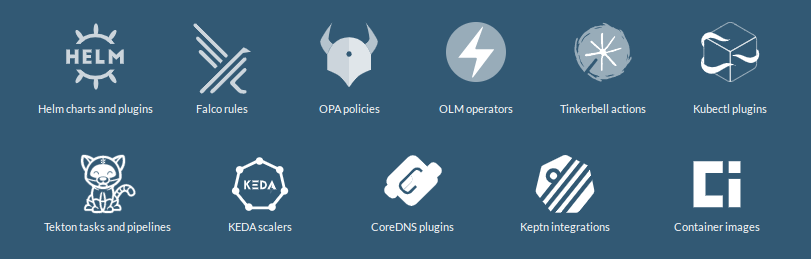
<ul>
  <li>Falco Rules</li>
  <li>OPA policies</li>
  <li>OLM operators</li>
  <li>Container Images</li>
  <li>and more!</li>
</ul>

<p><img src="/img/p/20220424_1.png" alt="artifacthub" /></p>

<p>So that brought me to the idea to add my container images, which I host on <a href="https://ghcr.io">ghcr.io</a>. But why do that?</p>

<p>The images are then searchable on ArtifactHub, but the one other cool feature is: you get a security report of your container image for free.</p>

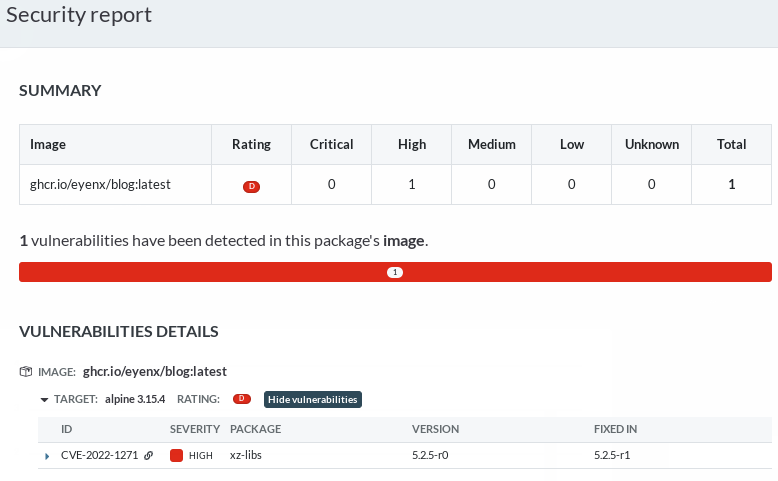
<p>As an example, this very site, is running in a container. And I added the container image to ArtifactHub, which tells me now, I got a vulnerability on it:</p>

<p><img src="/img/p/20220424_2.png" alt="vulnerability" /></p>

<p>This is very useful, right?</p>

<p>But how do you add your container images to ArtifactHub? Well first of all, create an account there. You can directly register with GitHub or Google, or use your email for registration:</p>

<p><img src="/img/p/20220424_3.png" alt="signup" /></p>

<p>Now you need to follow their <a href="https://artifacthub.io/docs/topics/repositories/#container-images-repositories">instructions</a> on how to label your container images properly so they can be shown on their site.</p>

<p>They support a whole lot of the <a href="https://opencontainers.org/">opencontainers</a> labels, but for starters these 3 labels are required for your image to even appear there.</p>

<ul>
  <li><code class="language-plaintext highlighter-rouge">io.artifacthub.package.readme-url</code> url of the readme file (in markdown format) for this package version. Please make sure it points to a raw markdown document, not HTML</li>
  <li><code class="language-plaintext highlighter-rouge">org.opencontainers.image.created</code> date and time on which the image was built (RFC3339)</li>
  <li><code class="language-plaintext highlighter-rouge">org.opencontainers.image.description</code> a short description of the package</li>
</ul>

<p>But as you are already adding labels to your images, please take the time and add the ones listed in the <a href="https://github.com/opencontainers/image-spec/blob/main/annotations.md">image-spec</a>.</p>

<p>I set those labels in my CI/CD pipeline. And as all of my public repos are hosted on <a href="https://github.com">GitHub</a> I end up doing this with <a href="https://github.com/features/actions">GitHub Actions</a></p>

<p><a href="https://github.com/eyenx/blog/blob/main/.github/workflows/build-image.yaml">Here</a> is the action I’m using for setting the labels on my blog container image:</p>

<div class="language-yaml highlighter-rouge"><div class="highlight"><pre class="highlight"><code>   <span class="pi">-</span> <span class="na">name</span><span class="pi">:</span> <span class="s">Build and push</span>
        <span class="s">id</span><span class="err">:</span> <span class="s">docker_build</span>
        <span class="s">uses</span><span class="err">:</span> <span class="s">docker/build-push-action@v2</span>
        <span class="s">with</span><span class="err">:</span>
          <span class="na">context</span><span class="pi">:</span> <span class="s">./</span>
          <span class="na">file</span><span class="pi">:</span> <span class="s">./Dockerfile</span>
          <span class="na">push</span><span class="pi">:</span> <span class="s">$</span>
          <span class="na">tags</span><span class="pi">:</span> <span class="s">$</span>
          <span class="na">labels</span><span class="pi">:</span> <span class="pi">|</span>
            <span class="s">io.artifacthub.package.readme-url=https://raw.githubusercontent.com/$/$/README.md</span>
            <span class="s">org.opencontainers.image.title=$</span>
            <span class="s">org.opencontainers.image.description=$</span>
            <span class="s">org.opencontainers.image.url=$</span>
            <span class="s">org.opencontainers.image.source=$</span>
            <span class="s">org.opencontainers.image.version=$</span>
            <span class="s">org.opencontainers.image.created=$</span>
            <span class="s">org.opencontainers.image.revision=$</span>
            <span class="s">org.opencontainers.image.licenses=$</span>
</code></pre></div></div>

<p>As you can see, I’m having a hard time creating the <code class="language-plaintext highlighter-rouge">readme-url</code> dynamically. I’ve not found a better solution yet.</p>

<p>For some standalone golang applications you might be using <a href="https://goreleaser.com/">goreleaser</a>. For such cases you can use <a href="https://github.com/eyenx/gursht/blob/main/.goreleaser.yaml">this configuration</a> for adding the right labels:</p>

<div class="language-yaml highlighter-rouge"><div class="highlight"><pre class="highlight"><code><span class="na">dockers</span><span class="pi">:</span>
  <span class="pi">-</span> <span class="na">image_templates</span><span class="pi">:</span>
      <span class="pi">-</span> <span class="s2">"</span><span class="s">ghcr.io/eyenx/gursht:"</span>
      <span class="pi">-</span> <span class="s2">"</span><span class="s">ghcr.io/eyenx/gursht:v"</span>
      <span class="pi">-</span> <span class="s2">"</span><span class="s">ghcr.io/eyenx/gursht:v."</span>
      <span class="pi">-</span> <span class="s2">"</span><span class="s">ghcr.io/eyenx/gursht:latest"</span>
    <span class="na">build_flag_templates</span><span class="pi">:</span>
      <span class="pi">-</span> <span class="s2">"</span><span class="s">--label=io.artifacthub.package.readme-url=https://raw.githubusercontent.com/eyenx//main/README.md"</span>
      <span class="pi">-</span> <span class="s2">"</span><span class="s">--label=org.opencontainers.image.created="</span>
      <span class="pi">-</span> <span class="s2">"</span><span class="s">--label=org.opencontainers.image.name="</span>
      <span class="pi">-</span> <span class="s2">"</span><span class="s">--label=org.opencontainers.image.revision="</span>
      <span class="pi">-</span> <span class="s2">"</span><span class="s">--label=org.opencontainers.image.version="</span>
      <span class="pi">-</span> <span class="s2">"</span><span class="s">--label=org.opencontainers.image.source="</span>
</code></pre></div></div>

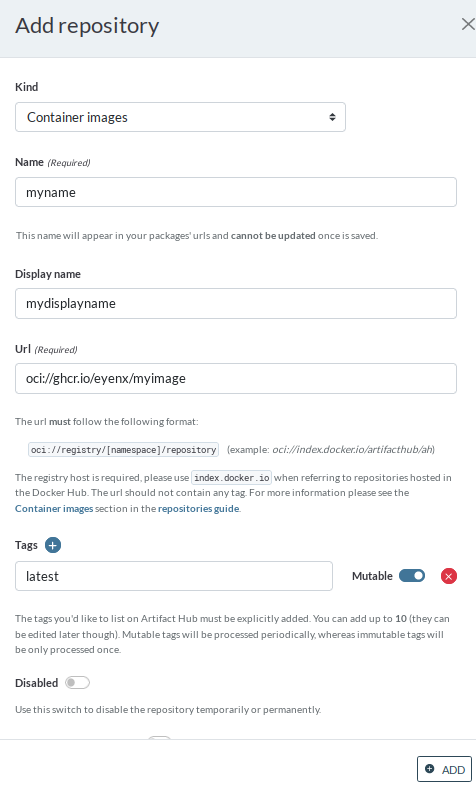
<p>After you’ve done that, and your image was built, you need to manually add it once on ArtifactHub.</p>

<p>On the control panel you can add a repository. Chose “Container images” as a kind and fill out the form:</p>

<p><img src="/img/p/20220424_4.png" alt="addimage" /></p>

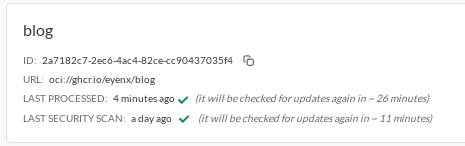
<p>The image will be then listed in the control panel, and you’ll see any errors that might happen while checking it. Usually it takes up to 30 minutes to have the first import and security scan happening.</p>

<p><img src="/img/p/20220424_5.png" alt="image" /></p>

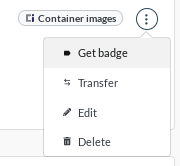
<p>With the three dots menu of the image you are also able to copy a badge you could add on the <code class="language-plaintext highlighter-rouge">README</code> of your repository, as I did for <a href="https://github.com/eyenx/blog">eyenx/blog</a>.</p>

<p><img src="/img/p/20220424_6.png" alt="badge" /></p>

<p>In the next few weeks I’m planning to add all my container images on ArtifactHub, so that I’ve got the security scanning covered without having to host any scanning tooling myself!</p>

<p>You can see my progress by searching directly on ArtifactHub for <a href="https://artifacthub.io/packages/search?user=eyenx&amp;sort=relevance&amp;page=1">eyenx</a>.</p>]]></content><author><name>eyenx</name><email>eye@eyenx.ch</email></author><category term="howto" /><category term="containers" /><category term="automation" /><summary type="html"><![CDATA[Do you know ArtifactHub? If not, go check it out, it’s a very cool site, holding over 8000 kubernetes packages. I mostly use the site for lurking around and find Helm charts. What I did not know, is that ArtifactHub supports way more packages then only Helm Charts:]]></summary></entry><entry><title type="html">Managing your DNS records with Terraform</title><link href="https://eyenx.ch/2020/10/25/managing-your-dns-records-with-terraform/" rel="alternate" type="text/html" title="Managing your DNS records with Terraform" /><published>2020-10-25T00:00:00+00:00</published><updated>2020-10-25T00:00:00+00:00</updated><id>https://eyenx.ch/2020/10/25/managing-your-dns-records-with-terraform</id><content type="html" xml:base="https://eyenx.ch/2020/10/25/managing-your-dns-records-with-terraform/"><![CDATA[<p>At my first FOSDEM, I went together with a co-worker to see a talk from <a href="https://github.com/Amygos">Matteo Valentini</a> regarding DNS and how to manage your records with a CI/CD pipeline.</p>

<p>He showed us <a href="https://github.com/github/octodns">octoDNS</a> a python tool from GitHub able to sync your local configuration with your DNS records managed at any thinkable cloud provider.</p>

<p>Until last weekend I was still using octoDNS to automatically manage my DNS on Azure through a CI/CD pipeline run with <a href="https://drone.io">drone</a>.</p>

<p>But I decided to switch to a different solution consisting of <a href="https://terraform.io">terraform</a> and <a href="https://digitalocean.com">Digitalocean</a> while keeping the pipeline on a self hosted drone server.</p>

<h2 id="setting-up-your-project">Setting up your project</h2>

<p>I created a <code class="language-plaintext highlighter-rouge">main.tf</code> file and a separate file for every single DNS zone I want to manage:</p>

<ul>
  <li><code class="language-plaintext highlighter-rouge">main.tf</code></li>
  <li><code class="language-plaintext highlighter-rouge">eyenx.ch.tf</code></li>
  <li><code class="language-plaintext highlighter-rouge">example.com.tf</code></li>
</ul>

<p>etc.</p>

<p>The contents of <code class="language-plaintext highlighter-rouge">main.tf</code> will describe the provider we want to use (in this case <code class="language-plaintext highlighter-rouge">digitalocean/digitalocean</code>), our API Token as variable and the remote backend <code class="language-plaintext highlighter-rouge">s3</code> which will be a space/bucket on Digitalocean. We will use the backend to save our <code class="language-plaintext highlighter-rouge">terraform.tfstate</code>.</p>

<div class="language-hcl highlighter-rouge"><div class="highlight"><pre class="highlight"><code><span class="nx">terraform</span> <span class="p">{</span>
  <span class="nx">required_providers</span> <span class="p">{</span>
    <span class="nx">digitalocean</span> <span class="o">=</span> <span class="p">{</span>
      <span class="nx">source</span> <span class="o">=</span> <span class="s2">"digitalocean/digitalocean"</span>
      <span class="nx">version</span> <span class="o">=</span> <span class="s2">"2.0.1"</span>
    <span class="p">}</span>
  <span class="p">}</span>

  <span class="c1"># DigitalOcean uses the S3 spec.</span>
  <span class="nx">backend</span> <span class="s2">"s3"</span> <span class="p">{</span>
    <span class="nx">bucket</span> <span class="o">=</span> <span class="s2">"mybucketname"</span>
    <span class="c1"># filename to use for saving our tfstate</span>
    <span class="nx">key</span>    <span class="o">=</span> <span class="s2">"terraform.tfstate"</span> 
    <span class="c1"># depends where you are setting up the space (fra1/ams1 etc..)</span>
    <span class="nx">endpoint</span> <span class="o">=</span> <span class="s2">"https://ams1.digitaloceanspaces.com"</span> 
    <span class="c1"># DO uses the S3 format</span>
    <span class="c1"># eu-west-1 is used to pass TF validation</span>
    <span class="nx">region</span> <span class="o">=</span> <span class="s2">"eu-west-1"</span> 
    <span class="c1"># Deactivate a few checks as TF will attempt these against AWS</span>
    <span class="nx">skip_credentials_validation</span> <span class="o">=</span> <span class="kc">true</span>
    <span class="nx">skip_metadata_api_check</span> <span class="o">=</span> <span class="kc">true</span>
  <span class="err">}</span>
<span class="p">}</span>

<span class="c1"># our digitalocean api token</span>
<span class="nx">variable</span> <span class="s2">"do_token"</span> <span class="p">{}</span> 

<span class="nx">provider</span> <span class="s2">"digitalocean"</span> <span class="p">{</span>
  <span class="nx">token</span> <span class="o">=</span> <span class="nx">var</span><span class="p">.</span><span class="nx">do_token</span> 
<span class="p">}</span>

</code></pre></div></div>

<h2 id="the-domain-zone-file">The domain zone file</h2>

<p>Our domain zone file will be kept very simple:</p>

<div class="language-hcl highlighter-rouge"><div class="highlight"><pre class="highlight"><code><span class="nx">resource</span> <span class="s2">"digitalocean_domain"</span> <span class="s2">"examplecom"</span> <span class="p">{</span>
   <span class="nx">name</span> <span class="o">=</span> <span class="s2">"example.com"</span>
   <span class="nx">ip_address</span> <span class="o">=</span> <span class="s2">"1.2.3.4"</span> <span class="c1"># default @ record</span>
<span class="p">}</span>

<span class="nx">resource</span> <span class="s2">"digitalocean_record"</span> <span class="s2">"examplecom-mail"</span> <span class="p">{</span>
  <span class="nx">domain</span> <span class="o">=</span> <span class="nx">digitalocean_domain</span><span class="p">.</span><span class="nx">examplecom</span><span class="p">.</span><span class="nx">name</span>
  <span class="nx">type</span> <span class="o">=</span> <span class="s2">"A"</span>
  <span class="nx">name</span> <span class="o">=</span> <span class="s2">"mail"</span>
  <span class="nx">value</span> <span class="o">=</span> <span class="s2">"1.2.3.5"</span> <span class="c1"># mail.example.com resolves to this IP</span>
<span class="p">}</span>

<span class="nx">resource</span> <span class="s2">"digitalocean_record"</span> <span class="s2">"examplecom-mx"</span> <span class="p">{</span>
  <span class="nx">domain</span> <span class="o">=</span> <span class="nx">digitalocean_domain</span><span class="p">.</span><span class="nx">examplecom</span><span class="p">.</span><span class="nx">name</span>
  <span class="nx">type</span> <span class="o">=</span> <span class="s2">"MX"</span>
  <span class="nx">name</span> <span class="o">=</span> <span class="s2">"@"</span>
  <span class="nx">priority</span> <span class="o">=</span> <span class="mi">10</span>
  <span class="nx">value</span> <span class="o">=</span> <span class="s2">"mail.example.com."</span> <span class="c1"># MX record</span>
<span class="p">}</span>

<span class="nx">resource</span> <span class="s2">"digitalocean_record"</span> <span class="s2">"examplecom-www"</span> <span class="p">{</span>
  <span class="nx">domain</span> <span class="o">=</span> <span class="nx">digitalocean_domain</span><span class="p">.</span><span class="nx">examplecom</span><span class="p">.</span><span class="nx">name</span>
  <span class="nx">type</span> <span class="o">=</span> <span class="s2">"CNAME"</span>
  <span class="nx">name</span> <span class="o">=</span> <span class="s2">"www"</span>
  <span class="nx">value</span> <span class="o">=</span> <span class="s2">"@"</span> <span class="c1"># CNAME record www.example.com &gt; example.com</span>
<span class="p">}</span>

<span class="nx">resource</span> <span class="s2">"digitalocean_record"</span> <span class="s2">"examplecom-txt-keybase"</span> <span class="p">{</span>
  <span class="nx">domain</span> <span class="o">=</span> <span class="nx">digitalocean_domain</span><span class="p">.</span><span class="nx">examplecom</span><span class="p">.</span><span class="nx">name</span>
  <span class="nx">type</span> <span class="o">=</span> <span class="s2">"TXT"</span>
  <span class="nx">name</span> <span class="o">=</span> <span class="s2">"_keybase"</span>
  <span class="nx">value</span> <span class="o">=</span> <span class="s2">"keybase-site-verification=SECRETCODE"</span> <span class="c1"># keybase verification TXT record</span>
<span class="p">}</span>


<span class="nx">resource</span> <span class="s2">"digitalocean_record"</span> <span class="s2">"examplecom-srv-imap-tcp"</span> <span class="p">{</span>
  <span class="nx">domain</span> <span class="o">=</span> <span class="nx">digitalocean_domain</span><span class="p">.</span><span class="nx">examplecom</span><span class="p">.</span><span class="nx">name</span>
  <span class="nx">type</span> <span class="o">=</span> <span class="s2">"SRV"</span>
  <span class="nx">name</span> <span class="o">=</span> <span class="s2">"_imap._tcp"</span>
  <span class="nx">value</span> <span class="o">=</span> <span class="s2">"mail.example.com."</span> <span class="c1"># SRV record for imap</span>
  <span class="nx">port</span> <span class="o">=</span> <span class="s2">"143"</span>
  <span class="nx">priority</span> <span class="o">=</span> <span class="mi">0</span>
  <span class="nx">weight</span> <span class="o">=</span> <span class="mi">1</span>
 <span class="err">}</span>
</code></pre></div></div>

<h2 id="initplanapply">Init/plan/apply</h2>

<p>What we now need is a init, plan &amp; apply to finish this up. But first we will have to export our secrets</p>

<div class="language-bash highlighter-rouge"><div class="highlight"><pre class="highlight"><code>
<span class="nb">export </span><span class="nv">TF_VAR_do_token</span><span class="o">=</span>SECRET_API_TOKEN
<span class="c"># has nothing to do with AWS, it's still Digitalocean, but terraform's s3 backend reads this</span>
<span class="nb">export </span><span class="nv">AWS_ACCESS_KEY_ID</span><span class="o">=</span>KEY_ID_FOR_ACCESS_TO_DO_SPACE 
<span class="nb">export </span><span class="nv">AWS_SECRET_ACCESS_KEY</span><span class="o">=</span>ACCES_KEY_FOR_ACCESS_TO_DO_SPACE 

terraform init
Initializing the backend...

Initializing provider plugins...
- Using previously-installed digitalocean/digitalocean v2.0.1

Terraform has been successfully initialized!

You may now begin working with Terraform. Try running <span class="s2">"terraform plan"</span> to see
any changes that are required <span class="k">for </span>your infrastructure. All Terraform commands
should now work.

If you ever <span class="nb">set </span>or change modules or backend configuration <span class="k">for </span>Terraform,
rerun this <span class="nb">command </span>to reinitialize your working directory. If you forget, other
commands will detect it and remind you to <span class="k">do </span>so <span class="k">if </span>necessary.

terraform plan
<span class="o">[</span>...]
digitalocean_record.examplecom-www: Refreshing state... 
digitalocean_record.examplecom-mail: Refreshing state...
digitalocean_record.examplecom-mx: Refreshing state... 
<span class="o">[</span>...]
Plan: 6 to add, 0 to change, 0 to destroy.


terraform apply <span class="c"># confirm with yes</span>
</code></pre></div></div>

<p>After applying the changes, please check that your <code class="language-plaintext highlighter-rouge">terraform.tfstate</code> has been uploaded to the Digitalocean space and check if the DNS is actually working:</p>

<div class="language-bash highlighter-rouge"><div class="highlight"><pre class="highlight"><code>host example.com
example.com has address 1.2.3.4
</code></pre></div></div>

<h2 id="automating-it">Automating it</h2>

<p>Let’s automate this by running a pipeline with drone. You can of course use any other CI/CD pipeline tooling you want to. For the main step in the pipeline we’ll be using the <a href="hub.docker.com/r/hashicorp/terraform">hashicorp/terraform</a> container image.</p>

<p>Example <code class="language-plaintext highlighter-rouge">.drone.yml</code>:</p>

<div class="language-yaml highlighter-rouge"><div class="highlight"><pre class="highlight"><code><span class="na">kind</span><span class="pi">:</span> <span class="s">pipeline</span>
<span class="na">type</span><span class="pi">:</span> <span class="s">docker</span>
<span class="na">name</span><span class="pi">:</span> <span class="s">dns</span>

<span class="na">steps</span><span class="pi">:</span>
  <span class="pi">-</span> <span class="na">name</span><span class="pi">:</span> <span class="s">terraform</span>
    <span class="na">image</span><span class="pi">:</span> <span class="s">hashicorp/terraform:0.13.4</span>
    <span class="na">commands</span><span class="pi">:</span>
      <span class="pi">-</span> <span class="s">terraform init</span>
      <span class="pi">-</span> <span class="s">terraform plan</span>
      <span class="pi">-</span> <span class="s">terraform apply -auto-approve</span>
    <span class="c1"># keep your secrets secret and not inside GIT!</span>
    <span class="na">environment</span><span class="pi">:</span>
      <span class="na">TF_VAR_do_token</span><span class="pi">:</span>
        <span class="na">from_secret</span><span class="pi">:</span> <span class="s">tf_var_do_token</span>
      <span class="na">AWS_SECRET_ACCESS_KEY</span><span class="pi">:</span>
        <span class="na">from_secret</span><span class="pi">:</span> <span class="s">aws_secret_access_key</span>
      <span class="na">AWS_ACCESS_KEY_ID</span><span class="pi">:</span>
        <span class="na">from_secret</span><span class="pi">:</span> <span class="s">aws_access_key_id</span>
    <span class="na">when</span><span class="pi">:</span>
      <span class="na">branch</span><span class="pi">:</span> <span class="s">master</span>
</code></pre></div></div>

<p>This way any time you push a new change to your master branch, the pipeline will take care of the rest.</p>

<p>And thanks to the remote backend being configured, you’ll be able to also apply your changes manually, from any device.</p>]]></content><author><name>eyenx</name><email>eye@eyenx.ch</email></author><category term="howto" /><category term="dns" /><category term="terraform" /><summary type="html"><![CDATA[At my first FOSDEM, I went together with a co-worker to see a talk from Matteo Valentini regarding DNS and how to manage your records with a CI/CD pipeline.]]></summary></entry><entry><title type="html">Migrating from Disqus to Isso</title><link href="https://eyenx.ch/2020/05/28/migrating-from-disqus-to-isso/" rel="alternate" type="text/html" title="Migrating from Disqus to Isso" /><published>2020-05-28T00:00:00+00:00</published><updated>2020-05-28T00:00:00+00:00</updated><id>https://eyenx.ch/2020/05/28/migrating-from-disqus-to-isso</id><content type="html" xml:base="https://eyenx.ch/2020/05/28/migrating-from-disqus-to-isso/"><![CDATA[<p>First of all: Thank you <a href="https://disqus.com/">Disqus</a>. I used it for a few years. And it worked well. But it was time to look for a self-hosted commenting server. And this is where <a href="https://posativ.org/isso/">Isso</a> comes into play.</p>

<p>Isso is a very lightweight commenting server you can host yourself, and the cool thing is, it even allows you to import comments from other providers like Disqus or Wordpress.</p>

<p>In this post, I will quickly show you how I migrated to Isso in a matter of minutes!</p>

<h1 id="export-your-data-first">export your data first</h1>

<p>Head out to your Disqus dashboard. Login in to the admin interface and you’ll find an export button. It should be available under the URL Path: <code class="language-plaintext highlighter-rouge">/admin/discussions/export</code>.</p>

<p>You can then start an export and wait for the download link you’ll get per mail.</p>

<p>The download is hosted on the domain https://media.disqus.com which had a expired SSL certificate for me:</p>

<div class="language-bash highlighter-rouge"><div class="highlight"><pre class="highlight"><code>openssl s_client <span class="nt">-connect</span> media.disqus.com:443 <span class="o">&lt;&lt;&lt;</span> QUIT | openssl x509  <span class="nt">-noout</span> <span class="nt">-enddate</span>
<span class="nv">depth</span><span class="o">=</span>2 C <span class="o">=</span> US, O <span class="o">=</span> DigiCert Inc, OU <span class="o">=</span> www.digicert.com, CN <span class="o">=</span> DigiCert Global Root CA
verify <span class="k">return</span>:1
<span class="nv">depth</span><span class="o">=</span>1 C <span class="o">=</span> US, O <span class="o">=</span> DigiCert Inc, CN <span class="o">=</span> DigiCert SHA2 Secure Server CA
verify <span class="k">return</span>:1
<span class="nv">depth</span><span class="o">=</span>0 C <span class="o">=</span> US, ST <span class="o">=</span> California, L <span class="o">=</span> San Francisco, O <span class="o">=</span> <span class="s2">"Disqus, Inc."</span>, CN <span class="o">=</span> <span class="k">*</span>.disqus.com
verify error:num<span class="o">=</span>10:certificate has expired
<span class="nv">notAfter</span><span class="o">=</span>Apr 27 12:00:00 2020 GMT
verify <span class="k">return</span>:1
<span class="nv">depth</span><span class="o">=</span>0 C <span class="o">=</span> US, ST <span class="o">=</span> California, L <span class="o">=</span> San Francisco, O <span class="o">=</span> <span class="s2">"Disqus, Inc."</span>, CN <span class="o">=</span> <span class="k">*</span>.disqus.com
<span class="nv">notAfter</span><span class="o">=</span>Apr 27 12:00:00 2020 GMT
verify <span class="k">return</span>:1
DONE
<span class="nv">notAfter</span><span class="o">=</span>Apr 27 12:00:00 2020 GMT
</code></pre></div></div>

<p>As we are migrating away from this provider, it doesn’t matter to us:</p>

<div class="language-bash highlighter-rouge"><div class="highlight"><pre class="highlight"><code>curl https://media.disqus.com/uploads/exports/your/download/url/you/got/per/mail.xml.gz <span class="nt">-o</span> disqus.xml.gz
<span class="nb">gunzip </span>disqus.xml
</code></pre></div></div>

<h1 id="setting-up-the-isso-environment">setting up the Isso environment</h1>

<p>You’ll need a subdomain with the sole purpose of hosting your commenting server. A.e <code class="language-plaintext highlighter-rouge">isso.domain.tld</code>.</p>

<p>After that, I headed to <a href="github.com/posativ/isso">Isso’s GitHub repository</a> and build a Docker image for the server</p>

<div class="language-bash highlighter-rouge"><div class="highlight"><pre class="highlight"><code>git clone github.com/posativ/isso
<span class="nb">cd </span>isso
docker build <span class="nb">.</span> <span class="nt">-t</span> isso
</code></pre></div></div>

<p><strong>FYI</strong>: I’m planning to automate the build, as I only found some old images on Docker hub and usually use newer images. I’ll share the image URL as soon as I set up the CI build.</p>

<p>Now let’s set up our directories to hold the database (SQLite) and the <code class="language-plaintext highlighter-rouge">isso.cfg</code> file:</p>

<div class="language-bash highlighter-rouge"><div class="highlight"><pre class="highlight"><code><span class="nb">mkdir</span> /myissoinstance/config
<span class="nb">mkdir</span> /myissoinstance/db
</code></pre></div></div>

<p>The <a href="https://posativ.org/isso/docs/configuration/server/">isso.cfg</a> is a really easy to configure file. This is a template of mine:</p>

<div class="language-plaintext highlighter-rouge"><div class="highlight"><pre class="highlight"><code>[general]
dbpath = /db/comments.db # where the db is located at
host = # allowed hosts to use the server
    http://domain.tld
    https://domain.tld
    https://otherblog.domain.tld
    http://localhost:8080/

notify = smtp # notify per mail

[smtp] # mail notification configuration
username = isso@domain.tld
password = mailpasswordsaredumb
host = mail.domain.tld
port = 587
security = starttls
to = me@domain.tld
from = isso@domain.tld
timeout = 10

[guard] # spam guard
enabled = true
ratelimit = 2
direct-reply = 3
reply-to-self = false # some of this stuff can be overridden with the clien configuration
require-author = true
require-email = false

[markup] # what options can be used on the client-side
options = strikethrough, superscript, autolink
allowed-elements =
allowed-attributes =

[admin] # wether to have the /admin interface enabled or not 
enabled = true
password = THEVERYSECRETPASSWORD
</code></pre></div></div>

<p>Put it inside <code class="language-plaintext highlighter-rouge">/myissoinstance/config/isso.cfg</code> and also put your <code class="language-plaintext highlighter-rouge">disqus.xml</code> under <code class="language-plaintext highlighter-rouge">/myissosinstance/config</code>. Now it’s time to import your Disqus comments:</p>

<div class="language-bash highlighter-rouge"><div class="highlight"><pre class="highlight"><code>docker run <span class="nt">-it</span> <span class="nt">--rm</span> <span class="nt">-v</span> /myissoinstance/config:/config <span class="nt">-v</span> /myissoinstance/db:/db isso <span class="nt">-c</span> /config/isso.cfg import /config/disqus.xml
</code></pre></div></div>

<p>A database should now be available under <code class="language-plaintext highlighter-rouge">/myissoinstance/db</code> and you should see, that there is something inside it:</p>

<div class="language-bash highlighter-rouge"><div class="highlight"><pre class="highlight"><code>sqlite3 /myissoinstance/db
sqlite&gt; <span class="k">select </span>count<span class="o">(</span><span class="k">*</span><span class="o">)</span> from comments<span class="p">;</span>
18
</code></pre></div></div>

<p>Wow, all this fuss for 18 comments. But that is me. You might as well have 1800 comments as far as I know.</p>

<h1 id="docker-compose">Docker compose</h1>

<p>Now it’s time to make it run indefinitely with <a href="https://docs.docker.com/compose/">docker-compose</a>.</p>

<p>I use <a href="https://hub.docker.com/r/containous/traefik">traefik</a> as my reverse proxy and have to configure this to make <code class="language-plaintext highlighter-rouge">https://isso.domain.tld</code> available:</p>

<div class="language-yaml highlighter-rouge"><div class="highlight"><pre class="highlight"><code><span class="na">version</span><span class="pi">:</span> <span class="s1">'</span><span class="s">3.3'</span>

<span class="na">services</span><span class="pi">:</span>
  <span class="na">app</span><span class="pi">:</span>
    <span class="na">image</span><span class="pi">:</span> <span class="s">isso</span>
    <span class="na">networks</span><span class="pi">:</span>
      <span class="pi">-</span> <span class="s">default</span>
    <span class="na">volumes</span><span class="pi">:</span>
      <span class="pi">-</span> <span class="s">/myissoinstance/config:/config</span>
      <span class="pi">-</span> <span class="s">/myissoinstance/db:/db</span>
    <span class="na">restart</span><span class="pi">:</span> <span class="s">always</span>
    <span class="na">labels</span><span class="pi">:</span>
      <span class="pi">-</span> <span class="s2">"</span><span class="s">traefik.frontend.entryPoints=http,https"</span>
      <span class="pi">-</span> <span class="s2">"</span><span class="s">traefik.port=8080"</span>
      <span class="pi">-</span> <span class="s2">"</span><span class="s">traefik.backend=myissoinstance_app"</span>
      <span class="pi">-</span> <span class="s2">"</span><span class="s">traefik.frontend.rule=Host:isso.domain.tld"</span>
<span class="na">networks</span><span class="pi">:</span>
  <span class="na">default</span><span class="pi">:</span>
    <span class="na">external</span><span class="pi">:</span>
      <span class="na">name</span><span class="pi">:</span> <span class="s">docker</span>
</code></pre></div></div>

<p>You could make it also available with any other reverse proxy, but the main thing here is, to be able to head to https://isso.domain.tld (or with /admin if the administration panel is active) and find your Isso instance.</p>

<h1 id="client-configuration">client configuration</h1>

<p>Now it’s time for the client configuration, or in other words, the configuration of javascript on your blog post.</p>

<p>There is a whole <a href="https://posativ.org/isso/docs/configuration/client/">documenation page</a>  dedicated to it.</p>

<p>For my part it was pretty easy. Just include this block at the end of your posts:</p>

<div class="language-html highlighter-rouge"><div class="highlight"><pre class="highlight"><code><span class="nt">&lt;div</span> <span class="na">class=</span><span class="s">"block"</span><span class="nt">&gt;</span>
<span class="nt">&lt;script </span><span class="na">data-isso=</span><span class="s">"https://isso.domain.tld/"</span> <span class="na">data-isso-require-author=</span><span class="s">"true"</span> <span class="na">#</span> <span class="na">overwriting</span> <span class="na">spam</span> <span class="na">guard</span> <span class="na">preferences</span> <span class="na">data-isso-avatar=</span><span class="s">"false"</span> <span class="na">src=</span><span class="s">"https://isso.domain.tld/js/embed.min.js"</span><span class="nt">&gt;&lt;/script&gt;</span> 
<span class="nt">&lt;section</span> <span class="na">id=</span><span class="s">"isso-thread"</span><span class="nt">&gt;&lt;/section&gt;</span>
<span class="nt">&lt;/div&gt;</span>
</code></pre></div></div>

<h1 id="problems">problems</h1>

<p>I tested it out first on localhost and then deployed it to <strong>PROD</strong>.  This way I saw that there was a problem with one of the comments which gave back a <code class="language-plaintext highlighter-rouge">500 internal server error</code> and also, that my blog post scheme had changed.</p>

<p>I’ve been using trailing slash in my blog post URI for quite a while now, and Disqus was handling this without problems. But Isso isn’t. If my blog post requested the comments for a post with a trailing slash, it didn’t receive any comments back from Isso as there wasn’t a blog post registered in the database (after the import from Disqus) with trailing slash.</p>

<p>The easiest fix for me was obviously to read the whole code of Isso and create a pull request on Github to fix this, <strong>NOT</strong>. I’m no superman. I just used <code class="language-plaintext highlighter-rouge">sqlite</code> and added a trailing slash to all my registered blog post inside the Isso database. But perhaps some folks out there might want to take a look at this.</p>

<h1 id="final-words">final words</h1>

<p>This was quite a big change for only hosting 18 comments IMHO. But I’ve got now a good feeling about it because I’m not hosting the comments somewhere on a third party provider anymore, but have them under my complete control.</p>

<h1 id="edit">EDIT</h1>

<p>I created a <a href="https://github.com/eyenx/docker-isso">repository</a> to automatically build Isso in a container. It will be available under <a href="https://hub.docker.com/r/eyenx/isso">eyenx/isso</a>.</p>]]></content><author><name>eyenx</name><email>eye@eyenx.ch</email></author><category term="howto" /><category term="comments" /><category term="selfhosted" /><summary type="html"><![CDATA[First of all: Thank you Disqus. I used it for a few years. And it worked well. But it was time to look for a self-hosted commenting server. And this is where Isso comes into play.]]></summary></entry><entry><title type="html">Using named scratchpads with xmonad</title><link href="https://eyenx.ch/2020/05/02/using-named-scratchpads-with-xmonad/" rel="alternate" type="text/html" title="Using named scratchpads with xmonad" /><published>2020-05-02T00:00:00+00:00</published><updated>2020-05-02T00:00:00+00:00</updated><id>https://eyenx.ch/2020/05/02/using-named-scratchpads-with-xmonad</id><content type="html" xml:base="https://eyenx.ch/2020/05/02/using-named-scratchpads-with-xmonad/"><![CDATA[<p>This will be a quick one. I always loved how i3 has the <a href="https://i3wm.org/docs/userguide.html#_scratchpad">scratchpad feature</a> and wanted to use this also with my <a href="https://xmonad.org">xmonad</a> setup.</p>

<p>It didn’t took me too long, to find out there is the <a href="https://hackage.haskell.org/package/xmonad-contrib-0.13/docs/XMonad-Util-NamedScratchpad.html"><code class="language-plaintext highlighter-rouge">XMonad.Util.NamedScratchpad</code></a> package which can be used to set up a number of scratchpads running different applications.</p>

<h2 id="configuration">Configuration</h2>

<p>First of all, import the package in your <code class="language-plaintext highlighter-rouge">xmonad.hs</code></p>

<div class="language-haskell highlighter-rouge"><div class="highlight"><pre class="highlight"><code><span class="kr">import</span> <span class="nn">XMonad.Util.NamedScratchpad</span>
</code></pre></div></div>

<p>Now we just need to write following code block to configure some scratchpads. As an example, I’ll set up 3 different scratchpads.</p>

<ul>
  <li>taskwarrior</li>
  <li>simple terminal</li>
  <li>pavucontrol</li>
</ul>

<div class="language-haskell highlighter-rouge"><div class="highlight"><pre class="highlight"><code><span class="c1">-- scratchPads</span>
<span class="n">scratchpads</span> <span class="o">::</span> <span class="p">[</span><span class="kt">NamedScratchpad</span><span class="p">]</span>
<span class="n">scratchpads</span> <span class="o">=</span> <span class="p">[</span>
<span class="c1">-- run htop in xterm, find it by title, use default floating window placement</span>
    <span class="kt">NS</span> <span class="s">"taskwarrior"</span> <span class="s">"urxvtc -name taskwarrior -e ~/bin/tw"</span> <span class="p">(</span><span class="n">resource</span> <span class="o">=?</span> <span class="s">"taskwarrior"</span><span class="p">)</span>
        <span class="p">(</span><span class="n">customFloating</span> <span class="o">$</span> <span class="kt">W</span><span class="o">.</span><span class="kt">RationalRect</span> <span class="p">(</span><span class="mi">2</span><span class="o">/</span><span class="mi">6</span><span class="p">)</span> <span class="p">(</span><span class="mi">2</span><span class="o">/</span><span class="mi">6</span><span class="p">)</span> <span class="p">(</span><span class="mi">2</span><span class="o">/</span><span class="mi">6</span><span class="p">)</span> <span class="p">(</span><span class="mi">2</span><span class="o">/</span><span class="mi">6</span><span class="p">)),</span>

    <span class="kt">NS</span> <span class="s">"term"</span> <span class="s">"urxvtc -name scratchpad"</span> <span class="p">(</span><span class="n">resource</span> <span class="o">=?</span> <span class="s">"scratchpad"</span><span class="p">)</span>
        <span class="p">(</span><span class="n">customFloating</span> <span class="o">$</span> <span class="kt">W</span><span class="o">.</span><span class="kt">RationalRect</span> <span class="p">(</span><span class="mi">3</span><span class="o">/</span><span class="mi">5</span><span class="p">)</span> <span class="p">(</span><span class="mi">4</span><span class="o">/</span><span class="mi">6</span><span class="p">)</span> <span class="p">(</span><span class="mi">1</span><span class="o">/</span><span class="mi">5</span><span class="p">)</span> <span class="p">(</span><span class="mi">1</span><span class="o">/</span><span class="mi">6</span><span class="p">)),</span>

    <span class="kt">NS</span> <span class="s">"pavucontrol"</span> <span class="s">"pavucontrol"</span> <span class="p">(</span><span class="n">className</span> <span class="o">=?</span> <span class="s">"Pavucontrol"</span><span class="p">)</span>
        <span class="p">(</span><span class="n">customFloating</span> <span class="o">$</span> <span class="kt">W</span><span class="o">.</span><span class="kt">RationalRect</span> <span class="p">(</span><span class="mi">1</span><span class="o">/</span><span class="mi">4</span><span class="p">)</span> <span class="p">(</span><span class="mi">1</span><span class="o">/</span><span class="mi">4</span><span class="p">)</span> <span class="p">(</span><span class="mi">2</span><span class="o">/</span><span class="mi">4</span><span class="p">)</span> <span class="p">(</span><span class="mi">2</span><span class="o">/</span><span class="mi">4</span><span class="p">))</span>
  <span class="p">]</span>

</code></pre></div></div>

<p>I will make use of the <code class="language-plaintext highlighter-rouge">classname</code> or <code class="language-plaintext highlighter-rouge">resource</code> of the window metadata to map them correctly. You can find out about those informations with a tool like <a href="https://linux.die.net/man/1/xprop"><code class="language-plaintext highlighter-rouge">xprop</code></a>.</p>

<div class="language-bash highlighter-rouge"><div class="highlight"><pre class="highlight"><code>xprop | <span class="nb">grep </span>WM_CLASS
</code></pre></div></div>

<p>Now you only need to select a window to find out it’s <code class="language-plaintext highlighter-rouge">WM_CLASS</code>.</p>

<p><img src="/img/p/20200502_1.gif" alt="xprop" /></p>

<p>The last thing to do is to set up the keybindings and add the scratchpads to the <code class="language-plaintext highlighter-rouge">manageHook</code>:</p>

<div class="language-haskell highlighter-rouge"><div class="highlight"><pre class="highlight"><code><span class="c1">-- scratchPad term</span>
<span class="p">,</span> <span class="p">(</span><span class="s">"M-S-</span><span class="se">\\</span><span class="s">"</span><span class="p">,</span> <span class="n">namedScratchpadAction</span> <span class="n">scratchpads</span> <span class="s">"term"</span><span class="p">)</span>
<span class="c1">-- scratchPad taskwarrior</span>
<span class="p">,</span> <span class="p">(</span><span class="s">"M-S-t"</span><span class="p">,</span> <span class="n">namedScratchpadAction</span> <span class="n">scratchpads</span> <span class="s">"taskwarrior"</span><span class="p">)</span>
<span class="c1">-- scratchPad pavucontrol</span>
<span class="p">,</span> <span class="p">(</span><span class="s">"M-v"</span><span class="p">,</span> <span class="n">namedScratchpadAction</span> <span class="n">scratchpads</span> <span class="s">"pavucontrol"</span><span class="p">)</span>
</code></pre></div></div>

<div class="language-haskell highlighter-rouge"><div class="highlight"><pre class="highlight"><code><span class="n">main</span> <span class="o">=</span> <span class="kr">do</span>
  <span class="n">xmonad</span> <span class="o">$</span> <span class="n">def</span> <span class="p">{</span>
  <span class="p">,</span><span class="n">manageHook</span> <span class="o">=</span> <span class="p">(</span><span class="n">myManageHook</span> <span class="o">&lt;+&gt;</span> <span class="n">namedScratchpadManageHook</span> <span class="n">scratchpads</span>
  <span class="p">}</span>
</code></pre></div></div>

<p>See <a href="https://github.com/eyenx/dotfiles/blob/master/.xmonad/xmonad.hs">my xmonad.hs</a> for more details.</p>

<h2 id="terminals-and-their-wm_class">Terminals and their WM_CLASS</h2>

<p>As you can see from my <a href="/img/p/20200502_1.gif">gif</a>, the terminal I am using is URxvt. All of my terminals will have the Classname <code class="language-plaintext highlighter-rouge">URxvt</code> so it seems impossible to get a named scratchpad working with a terminal running a specific application (a.e. Taskwarrior), because all <code class="language-plaintext highlighter-rouge">URxvt</code>terminals will have the same <code class="language-plaintext highlighter-rouge">WM_CLASS</code>.</p>

<p>This is where the <code class="language-plaintext highlighter-rouge">-name</code> parameter comes into play. Thanks to this additional parameter a specific name get’s set as additional <code class="language-plaintext highlighter-rouge">WM_CLASS</code> and I can use it to identify my scratchpads.</p>

<h2 id="wrationalrect">W.RationalRect?</h2>

<p>At last you should consider making usage of <code class="language-plaintext highlighter-rouge">XMonad.StackSet.RationalRect</code>:</p>

<div class="language-haskell highlighter-rouge"><div class="highlight"><pre class="highlight"><code><span class="kr">import</span> <span class="nn">XMonad.StackSet</span> <span class="k">as</span> <span class="n">W</span>
</code></pre></div></div>

<p>This gives you the ability to predefine the structure of the window geometry of your scratchpads.</p>

<p>This means, <code class="language-plaintext highlighter-rouge">RationalRect (3/5) (4/6) (1/5) (1/6)</code> would start drawing my scratchpad window at 3/5 of my x axis, and at 4/6 of my y axis. The window will then be 1/5 of my x axis in width and 1/6 of my y axis in height. This is super useful if you aren’t using the same resolution all the time.</p>

<p>Read more about <a href="https://hackage.haskell.org/package/xmonad-0.15/docs/XMonad-StackSet.html#t:RationalRect"><code class="language-plaintext highlighter-rouge">RationalRect</code> here</a> and don’t hesitate to <a href="https://eyenx.ch/about">contact</a> me if something is unclear. I’m no Haskell or XMonad expert, but I’ll do my best to help you out.</p>]]></content><author><name>eyenx</name><email>eye@eyenx.ch</email></author><category term="howto" /><category term="haskell" /><category term="xmonad" /><category term="windowmanager" /><summary type="html"><![CDATA[This will be a quick one. I always loved how i3 has the scratchpad feature and wanted to use this also with my xmonad setup.]]></summary></entry><entry><title type="html">How to set up your own matrix.org homeserver with federation!</title><link href="https://eyenx.ch/2020/04/26/how-to-set-up-your-own-matrix-homeserver-with-federation/" rel="alternate" type="text/html" title="How to set up your own matrix.org homeserver with federation!" /><published>2020-04-26T00:00:00+00:00</published><updated>2020-04-26T00:00:00+00:00</updated><id>https://eyenx.ch/2020/04/26/how-to-set-up-your-own-matrix-homeserver-with-federation</id><content type="html" xml:base="https://eyenx.ch/2020/04/26/how-to-set-up-your-own-matrix-homeserver-with-federation/"><![CDATA[<p>First of all let’s get one thing out of the way. If you think this will be a blog post about Keanu Reeves starring in his A-role you are wrong. Although I love <strong>The Matrix</strong>, and I’m talking just about the first movie, this blog post will be about setting up your own homeserver of <a href="https://matrix.org">matrix.org</a>. Matrix is an open network for secure, decentralized communication.</p>

<p><em>“Oh yet another chat tool? I’ve got telegram running and I’m fine”</em>, you might think. <strong>BUT</strong> Matrix isn’t quite the same. It’s <strong>decentralized</strong>, meaning there isn’t a central server. And it is also <strong>federated</strong> and of course: <strong>opensource</strong>.</p>

<p>You can thing of it like <strong>XMPP</strong> in the good old days. Does anybody used that? Oh yeah… me. You set up your own server, you create an account on <strong>your</strong> server, but are able to crosschat with other homeservers or the official <strong>matrix.org</strong> homeserver thanks to federation.</p>

<h2 id="preqrequesites">Preqrequesites</h2>

<p>What you’ll need to follow this tutorial:</p>

<ul>
  <li>a self-hosted server <strong>DOH</strong></li>
  <li>docker and docker-compose (or use your own container runtime engine)</li>
  <li>your own way of dealing with Let’s Encrypt certificates and proxing. I am using <a href="https://traefik.io">traefik</a>.</li>
  <li>a mail server</li>
  <li>DNS A Record: matrix.my.host:  IP.OF.YOUR.SERVER</li>
  <li>DNS SRV Record: _matrix._tcp.my.host: 0 10 443 matrix.my.host</li>
</ul>

<h2 id="lets-start">Let’s start</h2>

<p>This is the <code class="language-plaintext highlighter-rouge">docker-compose.yml</code> I am using to run synapse, the matrix homeserver:</p>

<div class="language-plaintext highlighter-rouge"><div class="highlight"><pre class="highlight"><code>version: '3.3'

services:
  app:
    image: matrixdotorg/synapse
    restart: always
    volumes:
      - /var/docker_data/matrix:/data
    labels:
      - "traefik.frontend.entryPoints=http,https"
      - "traefik.port=8008"
      - "traefik.backend=matrix_app"
      - "traefik.frontend.rule=Host:matrix.my.host"

</code></pre></div></div>

<p>The image I am using is: <a href="https://hub.docker.com/r/matrixdotorg/synapse">matrixdotorg/synapse</a>.</p>

<p>But before you can fire up this <code class="language-plaintext highlighter-rouge">docker-compose</code> file you’ll need to first generate a configuration, as explained in their <a href="https://github.com/matrix-org/synapse/blob/master/docker/README.md">README.md</a></p>

<div class="language-bash highlighter-rouge"><div class="highlight"><pre class="highlight"><code>docker run <span class="nt">-it</span> <span class="nt">--rm</span> <span class="nt">-v</span> /var/docker_data/matrix:/data <span class="nt">-e</span> <span class="nv">SYNAPSE_SERVER_NAME</span><span class="o">=</span>matrix.my.host <span class="nt">-e</span> <span class="nv">SYNAPSE_REPORT_STATS</span><span class="o">=</span><span class="nb">yes </span>matrixdotorg/synapse:latest generate
</code></pre></div></div>

<p>After generating the configuration, you can modify it at your will. Just go to <code class="language-plaintext highlighter-rouge">/var/docker_data/matrix/homeserver.yaml</code> and get your <code class="language-plaintext highlighter-rouge">$EDITOR</code> going.</p>

<p>At last, fire up your instance with <code class="language-plaintext highlighter-rouge">docker-compose up -d</code></p>

<h2 id="done-not-quite">Done? Not quite</h2>

<p>Well the first thing I was missing after heading to https://matrix.my.host is a way to register my username.</p>

<p>Two ways of doing that:</p>

<ul>
  <li>Set <code class="language-plaintext highlighter-rouge">enable_registration: true</code> in your <code class="language-plaintext highlighter-rouge">homeserver.yaml</code> and <code class="language-plaintext highlighter-rouge">docker restart matrix_app_1</code></li>
  <li><code class="language-plaintext highlighter-rouge">docker exec -it matrix_app_1 register_new_matrix_user -u myuser -p mypw -a -c /data/homeserver.yaml</code></li>
</ul>

<p>If setting <code class="language-plaintext highlighter-rouge">enable_registration</code> to true is used, be sure to set it back to false after registering your user if you do not want people to register on your homeserver.</p>

<h2 id="well-how-can-i-register-or-chat-now">Well how can I register or chat now?</h2>

<p>Just head to <a href="https://riot.im/app">riot.im</a> and login or register a user, by using an alternate homeserver and setting your homeserver FQDN.</p>

<p><img src="/img/p/20200426_1.png" alt="riot" /></p>

<p>But what is riot? It’s just one of the matrix client. You could even host your own instance or use another <a href="https://matrix.org/clients/">client</a>.</p>

<h2 id="federation-and-base-domain">Federation and base domain</h2>

<p>Well this should work out of the box right? Well not exactly. We need federation to work, so we are able to join other channels on other homeserver and chat privately with people using other homeserver.</p>

<p>As explained in the <a href="https://github.com/matrix-org/synapse/blob/master/docs/federate.md">docs</a>, federation works by connecting to your homeserver through port 8448. But we do not want to make port 8448 publicly available, what now?</p>

<p>Also we are using a subdomain to make our matrix homeserver available (matrix.my.host) but we wan’t our username to look like this: <code class="language-plaintext highlighter-rouge">myuser@my.host</code> and not like this: <code class="language-plaintext highlighter-rouge">myuser@matrix.my.host</code>.</p>

<p>Well there is a solution for these two problems:</p>

<p>In some cases you might not want to run Synapse on the machine that has the server_name as its public DNS hostname, 
  or you might want federation traffic to use a different port than 8448. For example, you might want to have your 
  user names look like @user:example.com, but you want to run Synapse on synapse.example.com on port 443. This can 
  be done using delegation, which allows an admin to control where federation traffic should be sent. See delegate.md
  for instructions on how to set this up.</p>

<p>Taking a look at <a href="https://github.com/matrix-org/synapse/blob/master/docs/delegate.md">delegate.md</a> explains quite a lot:</p>

<p>The URL https://<server_name>/.well-known/matrix/server should return a JSON structure containing the key m.server like so:
  {
      "m.server": "<synapse.server.name>[:<yourport>]"
  }</yourport></synapse.server.name></server_name></p>

<p>Okay, so we set up a static file on our <code class="language-plaintext highlighter-rouge">matrix.host</code> under <code class="language-plaintext highlighter-rouge">.well-known/matrix/server</code> giving this <code class="language-plaintext highlighter-rouge">JSON</code> back:</p>

<div class="language-plaintext highlighter-rouge"><div class="highlight"><pre class="highlight"><code>{ "m.server": "matrix.my.host:443" }
</code></pre></div></div>

<p>and we are good.</p>

<p>The last thing we will need to do is start from scratch. Yes, we will delete all data under <code class="language-plaintext highlighter-rouge">/var/docker_data/matrix</code> and change the <code class="language-plaintext highlighter-rouge">base_domain</code> in our generate command:</p>

<div class="language-bash highlighter-rouge"><div class="highlight"><pre class="highlight"><code>docker run <span class="nt">-it</span> <span class="nt">--rm</span> <span class="nt">-v</span> /var/docker_data/matrix:/data <span class="nt">-e</span> <span class="nv">SYNAPSE_SERVER_NAME</span><span class="o">=</span>my.host <span class="nt">-e</span> <span class="nv">SYNAPSE_REPORT_STATS</span><span class="o">=</span><span class="nb">yes </span>matrixdotorg/synapse:latest generate
</code></pre></div></div>

<p>This is needed, as we need to recreate keys and also users. Of course you could start right away with this, but I wanted to show all the modifications I had to do to get this thing running. If you do not need federation however, and want to chat only to users from your homeserver, this step is of course not needed.</p>

<h2 id="mail-verification">Mail verification</h2>

<p>I also wanted to verify my mail address. I thought this would be fairly easy, just set up a mailaccount for matrix and configure it in your <code class="language-plaintext highlighter-rouge">homeserver.yaml</code>:</p>

<div class="language-plaintext highlighter-rouge"><div class="highlight"><pre class="highlight"><code>email:
  smtp_host: mail.my.host
  smtp_port: 587
  smtp_user: "matrix@my.host"
  smtp_pass: "thisisapassword!"
  require_transport_security: true
  notif_from: "Your Friendly %(app)s homeserver &lt;noreply@my.host&gt;"

</code></pre></div></div>

<p>Well not quite. There is a <strong>bug</strong>. Synapse only tries to use TLS1.0 and some mailservers may reject that, like mine. There is already an <a href="https://github.com/matrix-org/synapse/issues/6211">open issue</a> to this problem.</p>

<p>So I thought to myself: <em>“Why not use a workaround?”</em></p>

<p>Just set up a second container, with a postfixforwarder in it, who will connect to my mail server using TLS &gt; 1.0 and deliver the mails. Synapse can then connect to this docker container without auth and without TLS.</p>

<p><strong>But please</strong>, be sure this container runs on the same server and is only accessible through the container network. We do not want to make port 25 of this container publicly available.</p>

<p>I used <a href="https://hub.docker.com/r/juanluisbaptiste/postfix">juanluisbaptiste/postfix</a> for this.</p>

<p>After modifying my <code class="language-plaintext highlighter-rouge">docker-compose.yml</code>:</p>

<div class="language-plaintext highlighter-rouge"><div class="highlight"><pre class="highlight"><code>version: '3.3'

services:
  app:
    image: matrixdotorg/synapse
    restart: always
    volumes:
      - /var/docker_data/matrix:/data
    labels:
      - "traefik.frontend.entryPoints=http,https"
      - "traefik.port=8008"
      - "traefik.backend=matrix_app"
      - "traefik.frontend.rule=Host:matrix.my.host"

  postfixfwd:
    image: juanluisbaptiste/postfix
    restart: always
    environment:
      - SMTP_SERVER=mail.my.host
      - SMTP_USERNAME=matrix@my.host
      - SMTP_PASSWORD=thisisapassword!
      - SERVER_HOSTNAME=postfixfwd.my.host
</code></pre></div></div>

<p>and of course the <code class="language-plaintext highlighter-rouge">homeserver.yaml</code>:</p>

<div class="language-plaintext highlighter-rouge"><div class="highlight"><pre class="highlight"><code>email:
  smtp_host: matrix_postfixfwd_1
  smtp_port: 25
  # no authentication needed
  #smtp_user: "matrix@my.host"
  #smtp_pass: "thisisapassword!"
  #require_transport_security: true
  notif_from: "Your Friendly %(app)s homeserver &lt;noreply@my.host&gt;"

</code></pre></div></div>

<p>I just had to restart synapse again and after that fire up the postfix forwarder container: <code class="language-plaintext highlighter-rouge">docker-compose up -d</code></p>

<p>Now I was able to send mails through my matrix server and verify my mailadress.</p>

<h2 id="what-now">What now?</h2>

<p>I am the only user on my matrix homeserver, but am able to join matrix.org chat rooms. I recently started chatting with <code class="language-plaintext highlighter-rouge">appservice-irc:matrix.org</code> too. This bot enables you to join IRC chat rooms on the <code class="language-plaintext highlighter-rouge">freenode.net</code> network.</p>

<p>Some useful commands there:</p>

<div class="language-plaintext highlighter-rouge"><div class="highlight"><pre class="highlight"><code>!help
!join #myroom
!listrooms
</code></pre></div></div>

<p>This is very useful, as I can easily follow up on IRC with my smartphone. Yeah, there is <a href="https://f-droid.org/en/packages/im.vector.alpha/">riot.im app</a> for Android.</p>

<h2 id="you-used-this-tutorial-with-success-contact-me">You used this tutorial with success? Contact me!</h2>

<p>If you managed to get synapse and federation working with this tutorial, I would appreciate if you would contact me. Of course you should do that through matrix: <code class="language-plaintext highlighter-rouge">@eyenx:eyenx.ch</code></p>]]></content><author><name>eyenx</name><email>eye@eyenx.ch</email></author><category term="howto" /><category term="docker" /><category term="containers" /><category term="matrix" /><category term="p2p" /><category term="decentralized" /><category term="chat" /><summary type="html"><![CDATA[First of all let’s get one thing out of the way. If you think this will be a blog post about Keanu Reeves starring in his A-role you are wrong. Although I love The Matrix, and I’m talking just about the first movie, this blog post will be about setting up your own homeserver of matrix.org. Matrix is an open network for secure, decentralized communication.]]></summary></entry></feed>